Mewurk 2026 Product Update: New Features and Improvements
Product updates are not just changelogs. At Mewurk, every release reflects a direct response to what HR managers across India tell us is broken, slow, or simply missing. In 2026, we pushed harder than in any previous year.
Two entirely new modules went live. Core features were rebuilt with better logic. The mobile experience was rethought. This blog covers every significant change in the Mewurk 2026 update, so you know exactly what is new and available today and how it fits your workforce reality.
Why 2026 Was a Defining Year for Mewurk
I have been part of Mewurk's product journey since early on, and 2026 is the year the platform crossed an important threshold. We moved from being a strong attendance and payroll tool to a more complete workforce intelligence system.
Three challenges shaped our roadmap this year:
The field workforce problem in India
More than 40% of India's organised workforce, who fall into sales, service, delivery, and collections, operate at least partially in the field. Most HR software ignores them completely or treats them as an afterthought.
Expense management gaps inside growing SMEs
As companies scale beyond 50 employees, manual expense processes will start to break. Timely reimbursements will seldom happen. The finance teams will start losing their visibility due to too many pending cases. Gradually, employees will start losing trust in their company's internal systems.
The demand for mobile-first HR
India now has over 750 million smartphone users. Yet most HRMS platforms in India still treat mobile as a secondary channel. We decided to change that for our users.
These three realities directly drove the biggest releases of this update cycle.
The Two Major New Modules in 2026
Field Visit Tracker
The Field Visit Tracker is the most requested feature in Mewurk's history. We officially launched it as a dedicated add-on in January 2026, and the feedback since then has been remarkable.
What it does:
GPS-Verified Client Check-ins
Field reps can check in and check out at client locations directly from the Mewurk mobile app. The app will automatically capture the precise GPS coordinates and timestamps. Thus, it will end the need for self-reported logs and disputes therein about whether a visit happened or not.
Live Team Map View
Managers will get a real-time map showing where every field employee is at any given moment. It will be easy to detect coverage gaps and coordinate between field reps without depending on phone calls.
Automated Travel and Distance Logging
Every kilometre travelled is recorded without the employee having to do anything manually. The data feeds directly into mileage reimbursement calculations.
Client Visit Reports
You can see visit frequency, time spent per client, and clients who have not been contacted recently. This is a significant advantage for sales managers who refuse to rely on assumptions.
New Client Creation On-the-Go
If your sales representative meets a new prospect on the way, they can add the client to the system right from the app during check-in. These records will be updated in real time.
Attendance Integration
Since the field visits are automatically synced with attendance and working hours, field employees' time is reflected accurately in payroll, just like office staff.
Who benefits most:
| Industry | Key Use Case |
|---|---|
| FMCG / Distribution | Territory coverage tracking, visit verification |
| Pharmaceuticals | Doctor visit compliance, call frequency reports |
| Financial Services | Loan officer site visits, KYC verifications |
| Retail Chains | Store audit visits, supervisor rounds |
| Facility Management | Site inspection tracking, technician dispatch |
The Field Visit Tracker is available as a selective add-on, and you can get custom pricing based on your requirements by contacting the Mewurk team.
You can assign it only to employees with field responsibilities. If you are a business with mixed office and field teams, you can deploy it precisely where it is needed.
Expense Management
The second major launch of 2026, and one that solves a problem every HR manager reading this has dealt with personally.
Before we built this module, Mewurk users managed expenses outside the platform entirely; usually through spreadsheets, WhatsApp messages to the finance team, or paper receipts collected at the end of the month. As you can guess, none of that works cleanly.
Most of the time, the reimbursements were delayed. There was no proper mechanism to apply policies consistently. And no one had a consolidated view of what the company was spending through employee claims.
What the Expense Management module covers:
Receipt Capture and Submission
Employees can photograph their receipts on their mobile device and submit expense claims directly from the Mewurk app. The submission is timestamped and linked to the employee profile.
All of these steps can be done in the same Mewurk Mobile App. There is no need to install a separate app or remember a separate login.
Policy-Based Approval Workflows
HR administrators can configure expense policies by category, like travel, food, accommodation, and client entertainment, and set limits per category or per employee grade. If claims exceed policy limits, they are automatically flagged and won't reach the approver.
Multi-Level Approvals
Expense claims follow a configurable approval chain. A field sales representative's claim might route to their direct manager first, then to the finance head for amounts above a threshold. You are free to define the workflow, and Mewurk will enforce it.
Payroll Integration
Approved expense reimbursements can be fed directly into Mewurk's payroll module. It will be a significant time-saving advantage for the finance team since they do not need to manually transfer data between systems. Reimbursements can be processed at the same time as salary, or on a separate cycle if you prefer.
Expense Analytics
You can configure the expense management module by employee, department, category, and time period to generate custom reports. Based on the reports, your finance leaders can spot patterns, identify outliers, and build more accurate cost forecasts for the next quarter.
What Changed in Existing Modules
Beyond the two new modules, the recent update cycle brought meaningful upgrades to features you already use in the Mewurk HRMS software.
Attendance Management Upgrades
Smarter Geo-Fencing Configuration
You can now define multiple geo-fenced zones per office location and set different radius tolerances for different teams. Manufacturing units with large campuses were a key reason we built this flexibility.
Late Mark and Early Exit Policy Automation
Previously, applying deductions for late arrivals or early exits required manual intervention. The system now handles this automatically based on the shift definition you have set, with exceptions routed to HR for review.
New Shift-Based Attendance - Moderate Policy
We introduced a new "Moderate" option under Shift-based attendance policies. Under this policy, employees receive full-day attendance credit if they complete the minimum required working hours, even if they arrived late or left early.
Late In and Early Out violations are still recorded for visibility, but they do not affect the attendance status. Employees on this policy are also eligible for overtime if they exceed the minimum required hours.
This is distinct from the existing "Strict" policy, which marks half-day attendance when minimum hours are met, but late in or early out violations are present.
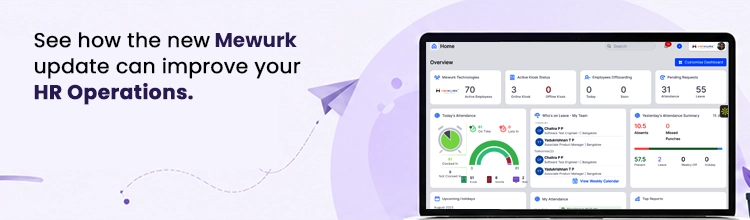
Real-Time Attendance Dashboard Redesign
The attendance dashboard was rebuilt to surface the most relevant data first. At a glance, HR managers can now see present count, absent count, late arrivals, and employees on approved leave - all without scrolling or switching tabs.
On-Duty Requests
Admins and HR can now enable On Duty (OD) Requests for specific attendance policies. Eligible employees, such as sales or client-facing staff, can apply for OD from both the mobile app and web portal when working outside the office.
HR can configure limits such as the maximum number of OD requests per month, whether location and reason capture is mandatory, and whether employees can apply for past or future days.
Once a manager approves the request, the employee's attendance is automatically marked as Present for that day. An On-Duty Report is also available in the Reports section.
Selfie-Based Attendance Punching
The Mewurk mobile app now supports selfie-based face recognition to mark attendance. It helps prevent proxy attendance by ensuring the employee's face is verified at the time of punching. This works alongside geo-fencing, so you can enforce both location and identity simultaneously.
Original Punch Logs for Regularised Attendance
Managers, HR, and Admins can now view the original punch logs and the reason provided by an employee whenever their attendance is regularised. This information is displayed directly in the daily attendance log view, improving audit transparency.
Bulk Manual Attendance Correction Filters
New substatus filters have been added to the Bulk Manual Correction page. Using this feature, HR can filter by specific error types such as Missed Punch, Insufficient Hours, and Shift Mismatch.
Additional status filters now allow corrections to be applied for Week Offs, Present on Week Offs, and Present days as well.
First In / Last Out Location in Attendance Export
The Daily Attendance Log export now includes the First In location and Last Out location alongside the existing time columns, giving HR and managers greater visibility into where employees are clocking in and out.
Leave Management Refinements
Hours-Based Comp-Off Management
Compensatory Off can now be granted based on the actual hours an employee worked on a holiday or a weekly off. HR can configure separate minimum hour thresholds for a Full-Day Comp Off (for example, 8 hours) and a Half-Day Comp Off (for example, 3.5 hours).
When an employee applies for Comp Off, the system will automatically display the hours they worked on the selected day and grant a Full-Day, Half-Day, or no Comp Off based on those hours relative to the configured thresholds. This replaces manual judgment with automatic, policy-driven accuracy.
Short Leave
Employees can now apply for short leave request when they will be unavailable for a few hours on a given day. The absence can be at the start of the day, the end of the day, or as a break within working hours.
Once the manager approves the leave request, the day is recorded as full attendance even though the employee was absent for the approved duration.
Holiday Calendar by Location
If you are a company operating across multiple states in India, you can now maintain separate public holiday calendars for each office location. An employee in Chennai and a colleague in Ahmedabad will each see the correct public holidays for their location.
Auto-Expiry of Monthly Credited Leaves
Leaves that are credited monthly and are not intended to carry over now expire automatically at the end of the month if unused. This eliminates manual tracking and keeps leave balances accurate.
Leave Encashment Calculations
The leave module now supports automated calculations for leave encashment, including integration with the payroll run. This has been a long-standing request from manufacturing and services companies with annual settlement cycles.
Auto-Approved Leave for Admin Users
Admin users without a reporting manager can now apply for leave directly. Such requests are auto-approved by the system, and leave balances are updated automatically.
Payroll Processing Updates
| What Changed | How It Affects You |
|---|---|
| Automated arrears calculation | Backdated salary revisions are computed and added to the next payroll run without manual input |
| Revised statutory compliance engine | PF, ESI, PT, and TDS calculations updated to reflect the latest applicable rules |
| Payslip customisation | Administrators can now add or hide components on the payslip to match company communication standards |
| Bulk salary revision | Salary revisions for entire departments or grades can be applied in a single action |
Shift Management Improvements
We overhauled shift assignment for rotational teams. Managers can now plan shifts three weeks in advance, publish the schedule to employees directly from the app, and handle swap requests through an approval workflow.
Employees can view their Shift Roster directly from the Mewurk Mobile App. Any updates or changes in shift timings will be visible in real time.
Employee Self-Service Enhancements
The ESS portal received a full mobile UI overhaul. Employees can now:
- Update personal and emergency contact details without raising an HR ticket
- Download payslips, Form 16, and other documents independently
- View the current leave balance as well as their full leave balance history
- Track the status of all submitted requests on one screen
The mobile app also now displays the leave types: Casual Leave, Sick Leave, Loss of Pay, and so on, directly on the attendance page. Based on that, both employees and managers can see the nature of each absence at a glance without switching screens.
Self-service adoption matters enormously for HR teams in India. Every routine query that an employee resolves independently is time freed up for strategic HR work.
WhatsApp Attendance Notifications
Admin and HR users can now receive the daily company-wide attendance summary directly on WhatsApp, in addition to the existing email notification. This is configured under Settings → General Settings → Notification Settings.
Late Punch-In Push Notifications
Admins and HR can now enable mobile push notifications that are sent automatically to employees who punch in late. This acts as a timely prompt and a deterrent against repeated late entries. The setting is available under Settings → General Settings → Notification Settings.
Mewurk Mobile App: What's New
The Mewurk mobile app is the primary interface for most users, and it received significant investment across the recent update cycle.
Key app changes:
Role-Based Home Screen Dashboard
The app dashboard now adapts based on the logged-in user's role. For Managers, Admins, and HR users, dashboard cards are grouped into two clear sections: People (team-related data) and My (personal information).
This replaces the previous single-view layout, where all cards were shown together.
Field Visit Tracker Integration
The Field Visit Tracker is fully integrated into the main Mewurk app. There is no need for a separate download.
Payroll Access
Employees can now view their Salary Structure and access payslips for any processed month directly in the app. Payslips can be downloaded as PDFs. Admin and HR users can view employee payroll information through the Directory section.
Kiosk Device Management on Mobile
HR and Admin users can now onboard, pair, and manage kiosk devices (face recognition biometric attendance machine) entirely from the mobile app.
Some key functions that can be achieved through this include re-syncing employee face images, clearing face images, office-wise sync, and unpairing devices.
A QR code can be generated from the app and scanned on the kiosk device to complete pairing.
Kiosk Photo Missing Filter
A new filter in the Employee Directory shows which employees have not yet had their kiosk face photo captured. This will make it easy to identify and resolve gaps before they affect face-recognition attendance.
Manager-Level Kiosk Photo Uploads
Team managers can now upload kiosk photos for their own team members directly, without needing HR or Admin involvement. These uploads will sync immediately with the kiosk system.
Internet Connectivity Alert
When the mobile app detects that there is no internet connection, you won't be left with an unresponsive screen. Rather, it will pop up a clear illustration screen and inform you about it.
Faster Load Times
We have made significant investments in performance improvements to benefit users on 4G connections, particularly in tier 2 and tier 3 cities.
A Quick Comparison: Mewurk Before and After the Update
| Capability | Before | After Update |
|---|---|---|
| Field team management | Not available | Full Field Visit Tracker module |
| Expense reimbursements | Outside the platform | Integrated Expense Management module |
| Multi-location holiday calendars | Single calendar only | Per-location holiday calendars |
| Comp-off management | Manual judgment-based process | Automated hours-based calculation with configurable thresholds |
| Shift-based attendance flexibility | Strict policy only | New Moderate policy option based on total hours |
| On Duty requests | Not available | Configurable OD workflows with automatic attendance marking |
| Payroll arrears | Manual calculation | Automated arrears computation |
| Mobile dashboard | Single combined view for all roles | Role-specific home screens separating People and My data |
| Shift planning | Week-by-week | Three-week advance planning with swap workflows |
| Kiosk management | Web portal only | Full management from mobile app |
Conclusion
This update represents one of the most significant release cycles in Mewurk's journey to date. Our goal has always been to build HR software that fits the actual texture of Indian businesses.
Field Visit Tracker and Expense Management are the headlines, but every module in the platform received meaningful attention.
We hope this guide gives you the clarity to make the most of what is now available. Happy exploring, and enjoy a more productive HR experience for your entire team with Mewurk.
Frequently Asked Questions
1. Is the Field Visit Tracker available to all Mewurk users?
Yes. It is available as a selective add-on for existing Mewurk customers. You can activate it for specific employees with field responsibilities without affecting other users.
2. Does the Expense Management module integrate with Mewurk payroll?
Not at the moment, but integration is coming soon. Once live, approved reimbursements will sync directly with payroll, allowing you to process them alongside monthly salaries or in a separate reimbursement cycle.
3. Can I maintain different public holiday calendars for offices in different states?
Yes. The update introduced per-location holiday calendars, so each office can reflect the correct state-specific public holidays automatically.
4. How does the Live Team Map in Field Visit Tracker work?
The map pulls GPS data from field employees' mobile devices and updates in real time. It will show every active field employee's current location on a single admin dashboard view.
5. Is the Mewurk update available without migrating to a new plan?
Most updates to existing modules roll out automatically. The Field Visit Tracker and Expense Management modules are add-ons with separate pricing. Contact the Mewurk team for details specific to your current plan.

Most Popular Post
Why Accurate Attendance and Leave Management Matters for Business Growth?
Read More →Why Accurate Attendance and Leave Management Matters for Business Growth?
How To Leverage Attendance Data For Better Workforce Management?
Read More →How To Leverage Attendance Data For Better Workforce Management?