Summary
Before running payroll, HR should verify employee records, attendance, leave, overtime, salary changes, deductions, new joiners, exits, bank details, statutory inputs, exceptions and approvals. These checks sit between the payroll cut-off and the final salary run. They give the payroll team a last window to fix wrong or missing data before money leaves the account.
Most payroll problems are not calculation problems. The formula in the system usually works. What goes wrong is the input. A manager approves overtime two days late. A new joiner is added to the HR system but not to the payroll module. An employee who left on the 18th is still marked active.
None of these look serious on their own. On payslip day, all of them turn into a WhatsApp message from an unhappy employee and a correction entry for finance.
A written payroll processing checklist fixes the order of work. Instead of remembering what to check, the team follows the same sequence every month. This article gives you 15 checks, in the order they make sense, plus a printable version you can keep next to your payroll calendar.
Key Takeaways
- Payroll accuracy depends on input quality, not on the calculation engine.
- Payroll data should be validated after the cut-off and before the final salary run.
- Attendance, leave and overtime need manager approval before they are entered into payroll.
- New joiners and exits cause the most first-time payroll errors.
- Deductions, arrears and statutory inputs should be checked employee by employee where amounts look unusual.
- A month-on-month variance check surfaces items for review, not proof of error.
- Final payroll should be reviewed and approved by a named person before the salary run.
- A checklist reduces payroll errors. It does not remove them completely.

What Is a Payroll Processing Checklist?
A payroll processing checklist is a structured set of checks HR and payroll teams complete before finalising salaries. It helps verify employee data, attendance, leave, overtime, salary changes, deductions, statutory inputs, bank details, exceptions and approvals before the salary run. The checklist is used every payroll cycle to catch missing or incorrect payroll inputs while corrections are still possible.
What it contains. A list of checks, what to verify under each one, who owns the check, and a place to mark it done. Some teams also record the date and the reviewer's name.
Who uses it. The payroll team runs most of it. HR owns employee data, joiners and exits. Reporting managers approve attendance, leave and overtime. Finance reviews the totals and funding. In smaller companies, one HR generalist may handle all of this, which makes a written checklist more useful, not less.
When it is used. After the payroll cut-off date, when inputs stop coming in, and before the final salary run. Some checks continue after the run, such as confirming that the bank file was processed and payslips were released.
Why it matters. Once salaries are credited, a correction becomes a recovery conversation. Recovering an overpayment from an employee is slow, uncomfortable and sometimes not practical. Catching the same issue two days earlier costs you one edit in the system.
Why Should HR Use a Pre-Payroll Checklist?

A pre-payroll checklist turns payroll from a memory exercise into a repeatable process. Here is what changes when a team uses one consistently.
Fewer payroll errors. Most misses are small and known: a late attendance correction, an unapproved increment, a missing bank detail. A checklist forces someone to look for these before finalisation.
Better data accuracy. Each input gets a defined owner and a defined check. Attendance is not assumed correct simply because it came from the biometric device.
Fewer salary queries. Every avoided error is an email HR does not have to answer on the 1st of the month.
Smoother approvals. Reviewers get a clean payroll register with exceptions already explained. Approval moves faster when the approver is not the person finding problems.
Fewer last-minute corrections. Corrections made during the run are risky because they often skip recalculation of dependent values, such as statutory components.
Better auditability. A signed checklist shows what was checked, by whom, and when. This helps during internal audit, statutory audit or a due diligence review.
Predictable salary processing. When the same steps run every month, payroll no longer depends on one person's memory. New team members can take over faster.
A checklist improves control. It cannot guarantee error-free payroll. If a manager approves the wrong overtime hours, the checklist will not know. What it will do is make the unusual number visible so a human can question it.
Payroll Processing Checklist: 15 Checks Before Salary Run
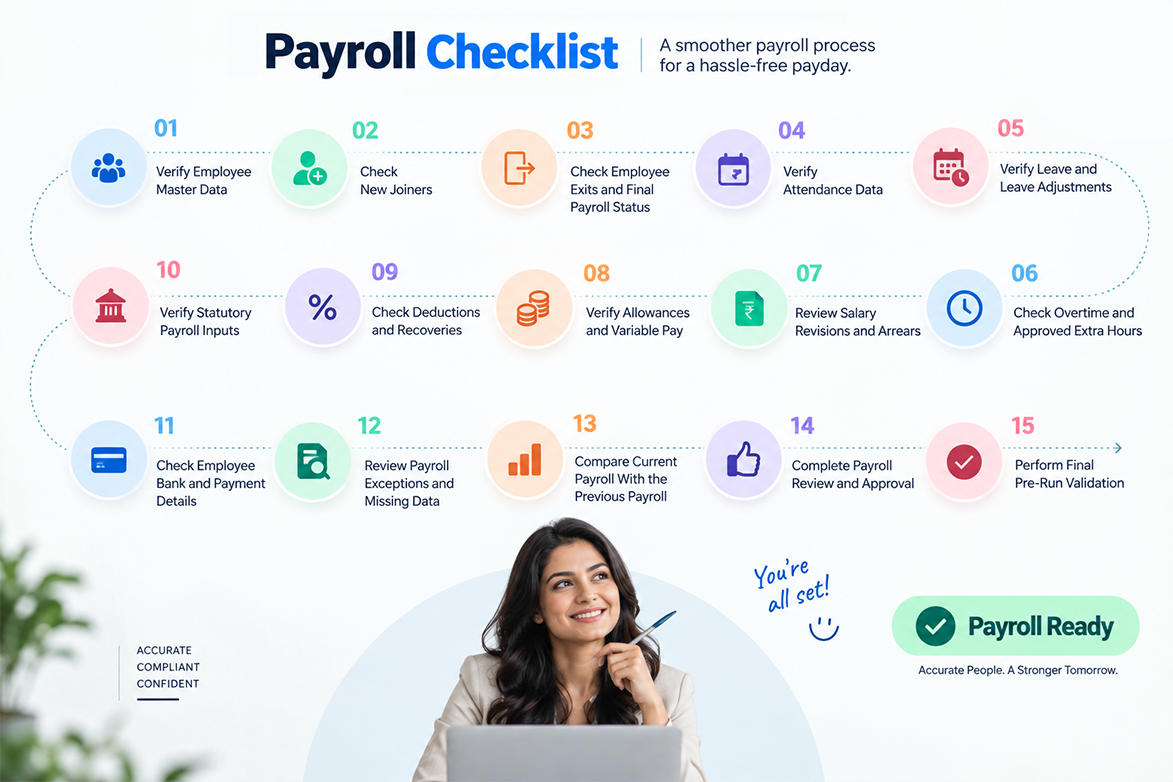
These 15 checks follow the natural order of a payroll cycle. Start with who is being paid, move to how much time they worked, then to what they earn and what is deducted, and finish with review and approval.
1. Verify Employee Master Data
Employee master data is the base layer of payroll. If it is wrong, every calculation built on it is wrong too.
Check the following for employees in the current payroll:
- Employee name and employee ID, exactly as they should appear on the payslip
- Department, designation, location and cost centre
- Employment status: active, probation, confirmed, notice period, inactive
- Date of joining and, where applicable, date of confirmation
- Assigned salary structure and CTC components
- Payroll group or pay cycle mapping
- Identifiers such as PAN, UAN and insurance numbers, where applicable
Why it matters: An incorrect salary structure mapping can change gross pay, allowance split and statutory calculations at the same time. It rarely fails loudly. It just produces a payslip that looks plausible and is wrong.
Who should check: HR owns the data. The payroll team verifies it against the payroll register.
2. Check New Joiners
New joiners are the single most common source of first-month payroll issues, especially those who join close to the cut-off.
For each joiner in this cycle, confirm:
- Date of joining and the number of payable days in the first month
- Salary structure in the system matches the offer letter
- Attendance tracking started from the joining date
- Bank account details captured and verified
- Statutory enrolment and declarations completed as applicable
- Tax declaration submitted, or a default treatment applied as per policy
- Any joining bonus, relocation payment or one-time component approved and flagged
Why it matters: A joiner who exists in the HR record but not in the payroll input list will simply not be paid. Pro-rata days are also calculated incorrectly when the joining date and the attendance start date do not match.
Who should check: HR for data and documents. Payroll team for pro-rata days and components.
3. Check Employee Exits and Final Payroll Status
Exits need a clear decision: is this person in the regular salary run, or in full and final settlement?
Verify:
- Last working day and resignation or exit approval on record
- Whether the employee should appear in this payroll run at all
- Notice period served, shortfall, and any recovery or payment due
- Leave encashment eligibility as per company policy
- Pending recoveries: advances, loans, assets, excess payments
- Status marked correctly so the employee does not roll into the next cycle
Why it matters: Paying someone a full month's salary after they left mid-month creates a recovery case. Recovery after exit often fails, and the amount ends up written off.
Who should check: HR for exit status. Payroll team for calculation. Finance for recovery and write-off decisions.
4. Verify Attendance Data
Attendance drives payable days, loss of pay and several allowances. It should be locked before payroll calculation begins.
Confirm:
- Attendance is finalised for the full payroll period
- Biometric, app-based or manual punches are synced and complete
- Missed punch regularisations are submitted and approved
- Week-offs, public holidays and company holidays are applied correctly
- Shift mapping is correct, especially for rotational shifts
- Loss of pay days are calculated and visible
- Field staff, site staff and remote employees are covered, not left blank
Why it matters: An employee with no attendance record may be treated as absent for the full month. That produces a zero or near-zero salary and an immediate escalation.
Who should check: Reporting managers approve. HR and the payroll team verify completeness.
Related reading: If attendance still moves to payroll through manual exports, our guide on connecting attendance data directly to payroll covers how teams reduce that handoff.
5. Verify Leave and Leave Adjustments
Leave data must be reconciled with attendance. The two often disagree.
Check:
- All leave applications for the period are approved or rejected, none left pending
- Leave balances are updated after approvals
- Paid leave and unpaid leave are correctly classified
- Compensatory off grants and usage are recorded
- Back-dated leave applied after the cut-off is handled as per policy
- Leave encashment, where applicable, is approved and calculated
- Maternity, paternity or other special leave is treated as per company policy and applicable law
Why it matters: When leave is not approved in the system, attendance shows the employee as absent, and the employee loses a day's pay for leave they were granted verbally.
Who should check: Managers approve leave. HR verifies classification and balances.
6. Check Overtime and Approved Extra Hours
Overtime should never be entered into payroll on trust. It needs a record and an approval.
Verify:
- Overtime hours captured for the correct period
- Manager approval recorded for each overtime entry
- Overtime eligibility as per company policy and applicable rules for that category of employee
- Overtime rate applied as per policy and applicable law
- No double benefit, such as overtime plus compensatory off for the same hours
- Overtime for field, shift and site employees is included
Why it matters: Unapproved overtime silently inflates costs. Missing overtime does the opposite and creates a genuine grievance, usually from the employees least likely to raise it formally.
Who should check: Managers approve. Payroll team validates rate and eligibility. Finance reviews the total when overtime costs are high.
7. Review Salary Revisions and Arrears
Increments, promotions and corrections often reach payroll late, with a past effective date.
Confirm:
- Approved revision letters exist for every change
- Effective date is recorded correctly
- Revised structure is applied from the right month
- Arrears are calculated for the correct period
- Arrear impact on statutory components is recalculated, not just added as a lump sum
- No revision is applied twice, once manually and once through the workflow
Why it matters: A revision applied from the wrong month either underpays the employee or creates an arrear that has to be reversed later. Both are visible on the payslip, and both generate queries.
Who should check: HR for approval and effective date. Payroll team for arrear calculation.
For the approval flow itself, see our walkthrough of how salary revisions move from proposal to payroll.
8. Verify Allowances and Variable Pay
Fixed allowances are usually safe. Variable pay is where the errors live.
Check:
- Fixed allowances match the assigned salary structure
- Shift allowance, night allowance and site allowance match attendance data
- Incentives, commissions and performance pay have approval and a correct calculation base
- One-time payments are flagged as one-time, not recurring
- Variable pay is loaded in the correct payroll month
- Travel or field allowances are supported by claims or attendance, as per policy
Why it matters: A one-time incentive left marked as recurring will pay again next month. That error is usually discovered two cycles later.
Who should check: Payroll team, with sign-off from the approving manager or Finance.
9. Check Deductions and Recoveries
Deductions affect net pay, so employees notice them immediately.
Verify:
- Salary advances and their repayment schedule
- Loan EMIs and outstanding balance
- Notice pay recovery for exits
- Asset recovery, canteen, transport or other policy-based deductions
- Recovery of excess payments from earlier months
- Loss of pay deduction matches attendance
- Deduction limits, where company policy sets a cap on total recovery in one month
- Each recurring deduction has a defined end date
Why it matters: A loan deduction that continues after the loan is closed is a direct financial error against the employee. It also damages trust in payroll, which is harder to repair than the amount itself.
Who should check: Payroll team and Finance.
10. Verify Statutory Payroll Inputs
Statutory components in India may include provident fund, employees' state insurance, professional tax, income tax deducted at source, labour welfare fund and gratuity accrual. Applicability varies by company and employee.
Review:
- Which statutory components apply to your organisation and to each employee
- Employee-level enrolment status and identifiers
- Wage components included in each statutory calculation, as per your defined rules
- Employee tax declarations, regime selection and proof submission status
- State-specific components, which differ by the state of employment
- Treatment of arrears and one-time payments within statutory calculations
- Changes in status during the month, such as a new joiner crossing an applicability threshold
Important: Rates, wage thresholds, due dates and applicability conditions are set by the relevant authorities and change from time to time. Confirm the current position from official sources rather than from summary articles. The primary references are EPFO (epfindia.gov.in), ESIC (esic.gov.in), the Income Tax Department (incometax.gov.in) and the Ministry of Labour & Employment (labour.gov.in). Professional tax and labour welfare fund are administered at the state level, so the applicable state government portal is the correct source.
Why it matters: Statutory errors do not stay inside payroll. They flow into monthly returns and annual filings, where correcting them takes far more effort than correcting a payslip.
Who should check: Payroll team, with review by Finance or the compliance owner. Many companies also involve their consultant or auditor for this check.
11. Check Employee Bank and Payment Details
This check protects the last step of the process. Everything else can be perfect, and the salary still will not land.
Confirm:
- Bank account number and IFSC code are present and correctly formatted
- Account holder name matches the employee record
- New joiners have verified bank details on file
- Employees paid by any other mode are flagged separately
- No duplicate account numbers across different employees
- Accounts that failed in a previous cycle have been corrected
- The payment file or bank advice matches the final payroll register
Why it matters: Checking employee bank details before the salary run helps identify incorrect or missing payment information before processing. A rejected transfer means a delayed salary for that employee and a manual re-initiation by finance.
Who should check: HR collects and updates. Payroll team validates. Finance confirms the payment file.
12. Review Payroll Exceptions and Missing Data
Exceptions are records that fall outside the expected pattern. Every payroll system and every spreadsheet produces them.
Look for:
- Zero net pay or negative net pay
- Gross pay lower than total deductions
- Employees with no attendance data
- Employees with no assigned salary structure
- Missing or invalid bank details
- Duplicate employee IDs or duplicate records for the same person
- Unusually high loss of pay days
- Active employees missing from the payroll register altogether
Why it matters: An exception is not automatically an error. An employee on long unpaid leave can legitimately have zero net pay. The point of the check is to make sure every exception has a known reason recorded against it.
Who should check: Payroll team, escalating to HR for data issues.
13. Compare Current Payroll With the Previous Payroll
Comparison is the fastest way to find problems you were not looking for. Compare at two levels.
- Company level: total headcount, total gross, total net, total deductions, total employer contributions and total overtime cost
- Employee level: net pay difference beyond a threshold your team sets, new entries, missing entries and large deduction changes
Why it matters: You do not need to know the correct number. You only need to notice that it moved. A variance check raises the question, "Why did this change?" which is usually enough to find the cause.
Who should check: The Payroll team prepares the comparison. Finance reviews the summary.
14. Complete Payroll Review and Approval
Payroll should be approved by someone who did not prepare it. This maker-checker separation is a basic internal control.
Ensure:
- The payroll register is reviewed in full, not only the totals
- Every open exception has a documented explanation
- Variance items have been reviewed and closed
- Finance has confirmed fund availability for the payout date
- Approval is recorded with a name and a date, not given verbally
- The payroll version is frozen after approval
Why it matters: Changes made after approval are the riskiest changes in the whole cycle. They are usually made under time pressure, and they often skip recalculation.
Who should check: Payroll owner prepares. HR head and Finance approve, as per your internal authority matrix.
15. Perform Final Pre-Run Validation
The last look before you press run. Keep it short and mechanical.
Confirm:
- No corrections were made after approval, or, if they were, the payroll was re-approved
- Register totals match the approved summary
- Payment file total matches the net pay total in the register
- Employee count in the payment file matches the register
- Payslip settings, templates and release date are correct
- A copy of the final register and the approval record is saved for audit
- Post-run tasks are listed: payment confirmation, payslip release, register filing, statutory workings prepared
Why it matters: Payroll finalisation is a point of no return. Two minutes of reconciliation here prevents a situation where the register shows one number, and the bank file shows another.
Who should check: Payroll team, with Finance confirming the payment file.
Payroll Processing Checklist Table
| # | Check | What to Verify | Responsible Team | Status |
|---|---|---|---|---|
| 1 | Employee master data | ID, name, department, status, salary structure | HR / Payroll | ☐ Pending |
| 2 | New joiners | Joining date, pro-rata days, structure, bank details | HR / Payroll | ☐ Pending |
| 3 | Employee exits | Last working day, F&F status, recoveries | HR / Finance | ☐ Pending |
| 4 | Attendance data | Finalised attendance, regularisations, LOP days | Managers / HR | ☐ Pending |
| 5 | Leave and adjustments | Approvals, balances, paid vs unpaid classification | Managers / HR | ☐ Pending |
| 6 | Overtime | Hours captured, approval, eligibility, rate | Managers / Payroll | ☐ Pending |
| 7 | Salary revisions and arrears | Approval, effective date, arrear period | HR / Payroll | ☐ Pending |
| 8 | Allowances and variable pay | Approvals, correct month, one-time flags | Payroll / Finance | ☐ Pending |
| 9 | Deductions and recoveries | Advances, loans, recoveries, end dates | Payroll / Finance | ☐ Pending |
| 10 | Statutory inputs | Applicability, enrolment, declarations, state rules | Payroll / Finance | ☐ Pending |
| 11 | Bank and payment details | Account number, IFSC, name match, duplicates | HR / Finance | ☐ Pending |
| 12 | Payroll exceptions | Zero pay, missing data, duplicates, blanks | Payroll | ☐ Pending |
| 13 | Month-on-month variance | Headcount, gross, net, per-employee movement | Payroll / Finance | ☐ Pending |
| 14 | Review and approval | Register review, documented sign-off, funding | HR Head / Finance | ☐ Pending |
| 15 | Final pre-run validation | Totals reconciled, payment file matched, records saved | Payroll | ☐ Pending |
Status marks are illustrative only. Leave the box empty while a check is pending and tick it once the check is complete.
Payroll Processing Steps Before the Salary Run
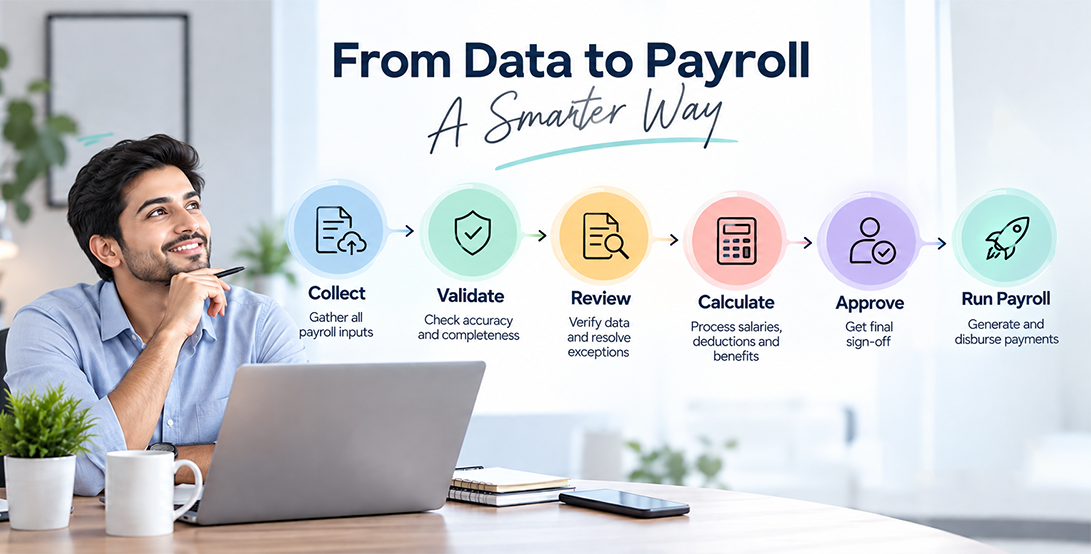
Here is the same work expressed as a sequence. Most teams run steps 1 to 7 over two or three days, then complete 8 to 12 on the calculation day.
- Collect payroll inputs. Gather attendance, leave, overtime, revisions, variable pay, deductions and exit details after the cut-off.
- Validate employee data. Confirm the list of employees to be paid, their status and their salary structures.
- Review attendance and leave. Lock attendance, close pending leave approvals, confirm loss of pay days.
- Check overtime. Match captured hours against manager approvals and eligibility rules.
- Apply approved salary changes. Load revisions, promotions and arrears with the correct effective dates.
- Verify deductions. Confirm recurring deductions, one-time recoveries and their end dates.
- Review exceptions. Resolve missing data, blank fields and unusual records before calculation.
- Calculate payroll. Run the payroll calculation and generate the payroll register.
- Compare payroll results. Run the month-on-month variance check at company and employee level.
- Obtain approval. Present the register with exception notes for documented sign-off.
- Run payroll. Finalise the salary run and generate the payment file.
- Perform post-run verification. Confirm payment success, release payslips, file the register and handle any failed transfers.
Post-run verification is the step most often skipped. It also tells you whether the previous eleven worked.
What Payroll Data Should HR Check Before Salary Processing?
| Payroll Input | What HR Should Check | Common Issue |
|---|---|---|
| Attendance | Period finalised, punches synced, regularisations approved, LOP calculated | Missing attendance for field or site staff, treated as absent |
| Leave | Approvals closed, balances updated, paid vs unpaid classified | Approved leave shown as absence because it was never entered |
| Overtime | Hours captured, manager approval, eligibility, rate as per policy | Overtime approved after the cut-off and missed in the run |
| Salary revisions | Approval letter, effective date, correct month of application | Arrears calculated for the wrong period |
| Allowances | Match with assigned salary structure and attendance-linked rules | Shift allowance paid without shift attendance support |
| Variable pay | Approval, calculation base, correct payroll month | One-time incentive left as recurring and paid again |
| Deductions | Amount, schedule, outstanding balance, end date | EMI continuing after the loan is closed |
| New joiners | Joining date, pro-rata days, structure, bank and statutory details | Joiner added to HR records but missing from payroll inputs |
| Exits | Last working day, F&F versus regular run, recoveries | Exited employee still paid a full month's salary |
| Bank details | Account number, IFSC, name match, active status | Transfer rejected due to an invalid or closed account |
| Employee status | Active, probation, notice period, inactive | Inactive employee still appearing in the payroll register |
| Arrears | Period, base amount, effect on statutory components | Arrears added as a flat amount without recalculation |
| Reimbursements | Claim approval, eligibility limit, supporting documents | Claim paid twice, once through payroll and once through finance |
How to Identify Payroll Errors Before the Salary Run
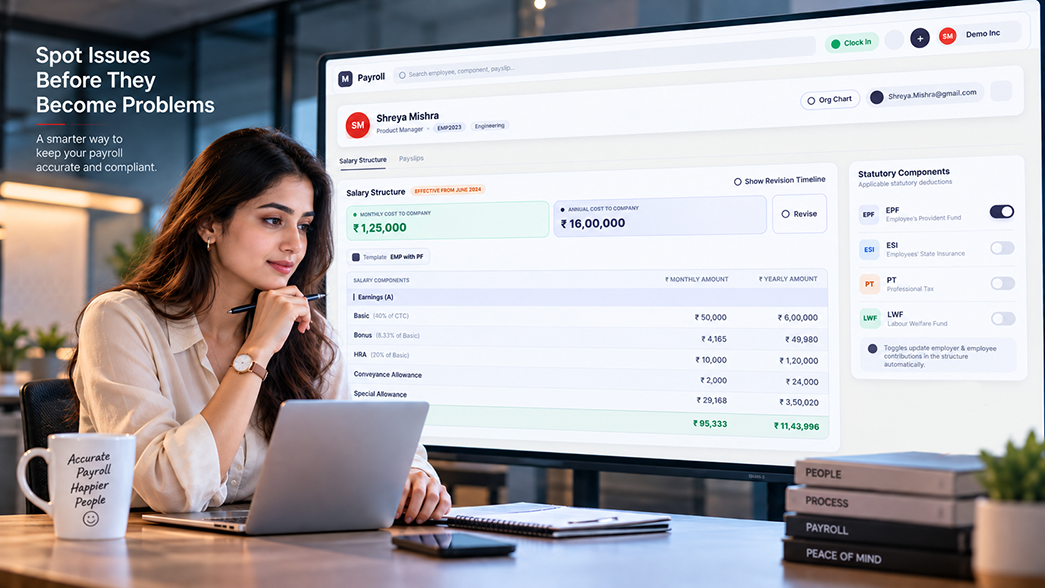
You cannot manually verify every employee in a 300-person payroll. What you can do is look at the right signals. These validation methods catch most issues quickly.
Sort by net pay, both ways. The highest and lowest values are where errors sit. Look at the top ten and the bottom ten.
Filter for zeros and negatives. Zero net pay, negative net pay and gross lower than deductions should each have a recorded reason.
Check the count first. Compare the number of employees in the payroll register against your active headcount. If they do not match, find the difference before checking anything else.
Look for duplicates. Sort by employee ID, name and bank account number. Duplicate values in any of these columns need investigation.
Scan for blanks. Blank attendance, blank salary structure, blank bank details and blank department are all disqualifying gaps.
Compare with last month at employee level. Any net pay change beyond a threshold you set should be explained.
Review the deduction column separately. Large or unexpected deductions cause the most employee complaints, so they deserve their own pass.
Cross-check joiners and leavers against the HR register. This two-minute comparison prevents the most expensive errors.
Payroll Red Flags
| Red Flag | Possible Cause | What to Do |
|---|---|---|
| Zero or very low net pay | Missing attendance, full month unpaid leave, high recovery | Check attendance record and deduction schedule for that employee |
| Salary increased sharply | Unapproved revision, arrears, incentive, duplicate component | Trace the increase to a specific approved component |
| Overtime doubled | Genuine extra work, wrong hours entered, duplicate upload | Verify against approved overtime records |
| Unexpected deduction | New recovery, wrong loan mapping, duplicate EMI | Check the deduction start date and outstanding balance |
| Employee missing from payroll | Status marked inactive, joiner not added, structure not assigned | Compare payroll register against the active employee list |
| Inactive employee present | Exit not updated, F&F flag not set | Confirm last working day with HR |
| Identical net pay for different employees | Wrong structure mapping, copied record | Compare salary structures side by side |
| Negative net pay | Recovery exceeds earnings for the month | Apply the deduction cap as per company policy and reschedule |
| Duplicate bank account | Data entry error, or a genuine shared account | Verify with the employees before the payment file is generated |
| Missing new joiner salary | Joiner processed after the cut-off | Decide whether to include in this run or process separately |
Payroll Variance Check: Compare This Month With Last Month
A payroll variance check compares the current month's payroll with the previous month's at the company and employee levels. Any significant movement is flagged for review. It is one of the fastest ways to find payroll errors because it does not require you to know the correct answer in advance. It only requires you to notice a change.
Items worth flagging:
- An employee's salary increased, and you cannot immediately point to the approval
- Overtime for a team suddenly doubled
- A deduction appeared, disappeared or changed substantially
- An employee who was paid last month is missing from this month's register
- An employee who exited last month is still appearing
- A new joiner's salary is not reflected at all
- Total employer contributions moved sharply without a headcount change
Many teams set a percentage threshold, such as flagging any employee whose net pay moved by more than 10% month on month. The threshold is a working convention, not a rule. Choose one that produces a review list your team can actually work through in an hour.
A variance is a question, not a verdict. An employee who took ten days of unpaid leave last month will show a large positive variance this month, and that is completely correct. The purpose of the check is to ensure someone reviewed the movement and confirmed the reason. Treating every variance as an error wastes time and creates unnecessary corrections.
What Happens If HR Finds an Error Before the Salary Run?
Finding an error before the run is a good outcome. It means the process worked. Handle it in a defined sequence rather than editing the register directly.
| Step | What to do |
|---|---|
| Identify | Record what looks wrong, for which employee, and in which component |
| Verify | Confirm it is actually an error by checking the source document: the approval, the attendance record, the deduction schedule |
| Correct | Fix the input at source, not in the output. Update the attendance record, the leave approval or the salary structure |
| Recalculate | Re-run the payroll calculation so dependent values, including statutory components, update together |
| Review | Check the corrected record and confirm nothing else moved unexpectedly |
| Approve | Obtain fresh approval if the correction changed the approved totals |
| Run payroll | Proceed with the salary run |
A surprising number of flagged items turn out to be correct, so the verify step matters as much as the fix. Editing only the payroll register is a common shortcut, and it means the same error will return next month because the source data was never touched.
Resolving errors before finalisation matters because the alternative is worse. After salaries are credited, an underpayment needs a separate payment and an explanation. An overpayment requires recovery, which needs the employee's agreement and may stretch across months. Both create adjustment entries that complicate reconciliation later. The same fix applied before the run is a single edit.
Payroll Checklist vs Payroll Cut-Off Date
These two ideas work together, but they are not the same thing. The cut-off date tells you when inputs stop. The checklist tells you what to verify once they have stopped.
| Topic | Payroll Cut-Off Date | Payroll Processing Checklist |
|---|---|---|
| Main purpose | Sets the deadline for payroll inputs | Validates payroll data before finalisation |
| Focus | Timing | Accuracy |
| Main question | When should inputs close? | What should we check? |
| Used for | Building the payroll calendar | Pre-run validation |
| Owner | HR and Finance, set in advance | Payroll team, executed every cycle |
| Frequency | Defined once, reviewed occasionally | Run every payroll cycle |
| Output | A published date each month | A completed, signed checklist |
In practice, the cut-off date starts the checklist. Once inputs are closed, the payroll window opens, and the team begins verification. A well-set cut-off gives you enough working days to complete all 15 checks without rushing. A cut-off that is too close to the payout date is the most common reason teams skip validation.
If you are still deciding on your own dates, read our detailed guide on setting and managing payroll cut-off dates for the calendar side of the process.
Payroll Processing Checklist for Indian Companies
Payroll practice in India varies widely by company size, sector and state of operation. A ten-person startup and a 500-person manufacturing unit with multiple state locations do not run the same process, and neither should pretend to.
What follows are areas Indian HR teams commonly need to review. Treat them as areas to assess for your organisation, not as a universal mandatory process.
Applicable statutory deductions. Determine which components apply to your organisation and to each employee. Provident fund, employees' state insurance, professional tax, income tax deducted at source, labour welfare fund and gratuity have different applicability conditions. Some are central, some are state-administered. Applicability can also change for an individual employee during their employment.
Employee payroll information. Identifiers, enrolment status, declarations and nominations should be complete before the employee's first payroll. Incomplete records tend to surface as filing problems rather than payslip problems.
Salary structure. How components are defined affects statutory calculations. Review structures when you introduce new components or revise the pay policy.
Attendance and leave. Many Indian companies operate multiple shifts, sites and attendance methods in the same payroll. Confirm all employee categories are covered, including field staff and roles you process internally.
Overtime. Eligibility and rates depend on the employee category, company policy and applicable rules. Overtime for factory and site employees typically requires more detailed documentation than for office roles.
Salary revisions. Increment cycles frequently produce arrears with past effective dates. Confirm the arrear period and the recalculation of statutory components.
Joining and exit changes. These drive pro-rata calculations, notice recovery, leave encashment and full and final settlement. Keep the payroll cut-off and the HR exit process aligned.
Payroll approvals. Define who prepares, who reviews and who approves. Record it. This matters during audit.
Payment information. Verified bank details and a reconciled payment file complete the cycle.
Separating Policy, Practice and Law
This distinction is worth making explicitly, because the three are often mixed together in payroll discussions.
| Type | What it means | Examples |
|---|---|---|
| Company policy | Decided internally by your organisation | Payroll cut-off date, leave encashment rules, deduction caps, overtime eligibility for non-covered grades, reimbursement limits |
| Payroll best practice | Not required by law, but widely used for control | Maker-checker approval, month-on-month variance review, exception logs, signed payroll register, pre-run validation |
| Legal or statutory requirement | Set by central or state authorities | Applicability, rates, wage thresholds and return timelines for provident fund, employees' state insurance, professional tax, income tax and similar components |
For anything in the third column, rely on official sources. Rates, thresholds, forms and due dates are revised from time to time, and secondary articles quickly go out of date.
Start with these official portals, and refer to your state government portal for state-administered components. Where your situation is unclear, your auditor or payroll consultant is the right person to confirm it.
- Employees' Provident Fund Organisation (EPFO)
- Employees' State Insurance Corporation (ESIC)
- Income Tax Department
- Ministry of Labour & Employment
For related reading on the payment side of the cycle, see our overview of salary payment rules that apply to Indian employers and our explainer on how minimum wage is determined in India.
Spreadsheet Payroll Checklist vs HRMS
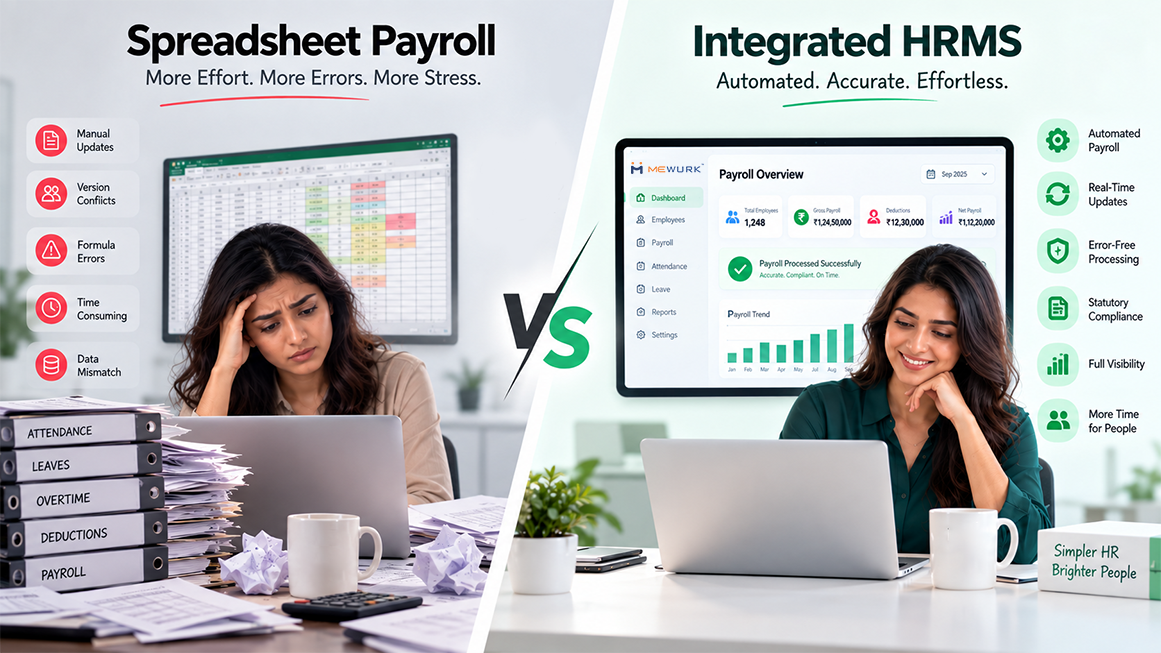
Plenty of companies run accurate payroll on spreadsheets. The question is not whether spreadsheets work. It is how much manual effort your current headcount and structure require, and how much key-person risk you are carrying.
| Area | Spreadsheet | HRMS |
|---|---|---|
| Employee data | Maintained manually, often in more than one file | Centralised in a single employee record |
| Attendance inputs | Manual import or manual update each cycle | Can be integrated where supported |
| Leave data | Tracked separately and reconciled by hand | Centralised with balances updated on approval |
| Validation | Manual checks, dependent on the reviewer's experience | System-supported checks and exception lists |
| Approvals | Email or verbal, tracked informally | Workflow-based where supported |
| Reports | Prepared each month manually | Automated or system-generated where supported |
| Audit trail | Depends entirely on the process followed | Usually easier to track |
| Scalability | Becomes harder as headcount and structures grow | Designed to manage larger workflows |
| Key-person risk | High when one person owns the file | Lower, since the process sits in the system |
An HRMS does not automatically solve payroll problems. If attendance approvals are late, they will be late in the system too. If salary revisions are communicated verbally, no workflow will capture them. What a system changes is where the work happens and how visible it is. The checks in this article still need a person to review them and a person to approve them.
How Mewurk Can Help With Payroll Processing
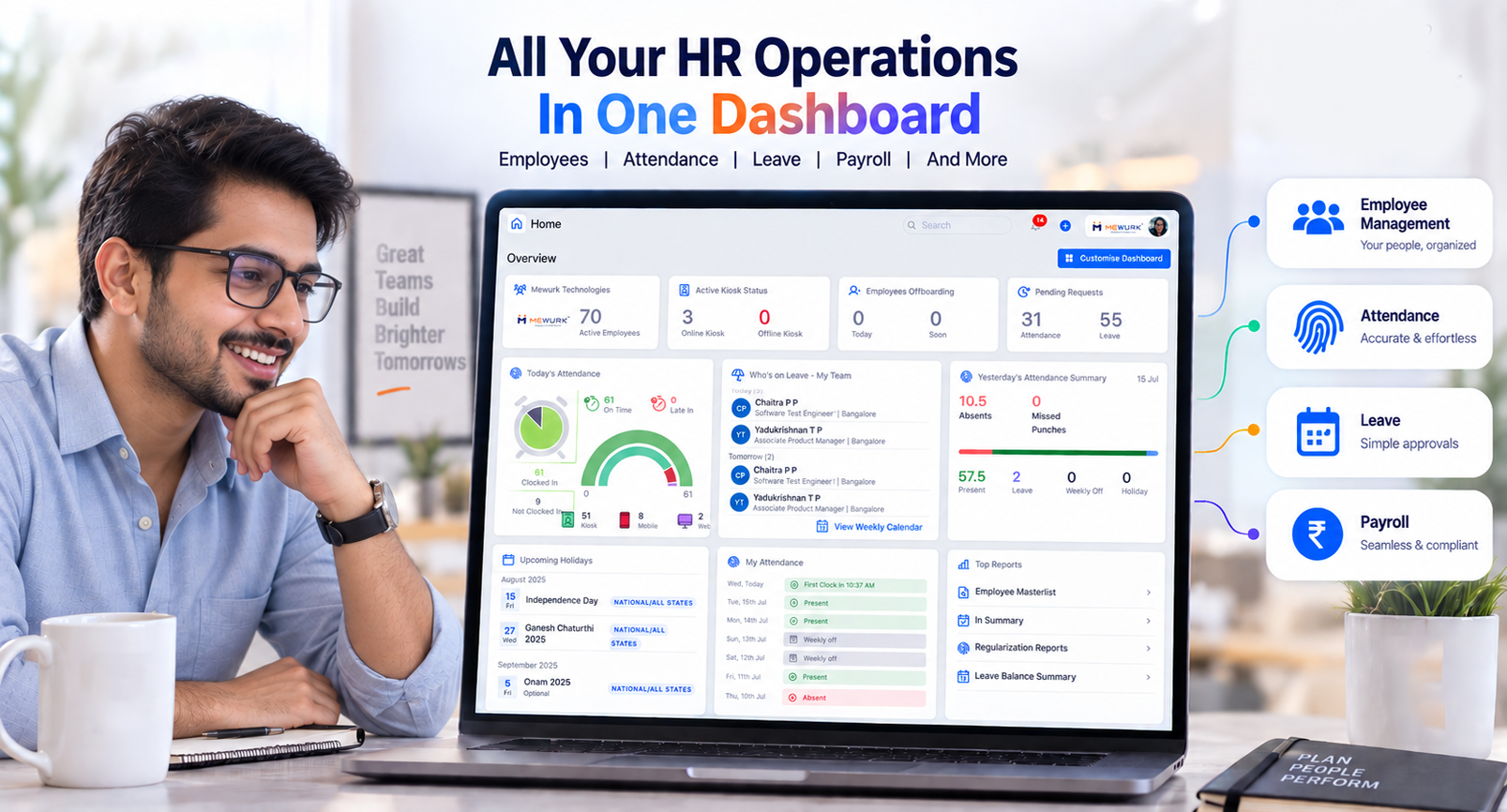
Most of the 15 checks above depend on one thing: whether your payroll inputs sit in one place or across several files. Mewurk is an HR platform that brings employee, attendance, leave and payroll data together, so the pre-run checks work against a single source.
Capabilities relevant to this checklist include:
- Employee management for maintaining employee master data, employment status and payroll-related information in one record, which supports checks 1, 2 and 3.
- Attendance management for capturing and reviewing attendance data before it reaches payroll, which supports check 4.
- Leave management for leave applications, approvals and balances, which supports check 5.
- Shift management for mapping employees to shifts, useful where attendance and allowances depend on shift data.
- Payroll management for processing salaries using the employee, attendance and leave data already held in the platform.
- Attendance-to-payroll workflow, so finalised attendance moves into payroll processing without a separate manual export.
- Salary revision workflows for recording approved revisions with their effective dates, which supports check 7.
- Reports and analytics for producing payroll and workforce reports that help with review, variance comparison and audit records.
You can read more about the attendance side of this on the Mewurk attendance management system page.
What this does not remove is the human judgement in the process. Someone still has to review the exception list, ask why a number moved, and approve the final register. A platform makes those tasks faster to perform and easier to provide evidence for. It does not perform them for you.
Payroll Processing Checklist: Printable Version
Print this, or keep it open next to your payroll calendar. Tick each item before you finalise the salary run.
| Cycle | Prepared by | Reviewed by | Approved on |
|---|---|---|---|
Common Payroll Processing Mistakes
- Skipping pre-run validation. The cut-off is too close to the payout date. Fix: move the cut-off earlier so you have two or three clear working days for checks.
- Relying only on spreadsheets. The file grew along with the company. Fix: keep the spreadsheet if it works, but add a fixed checklist and a second reviewer.
- Missing late attendance corrections. Regularisations arrive after the cut-off. Fix: publish the cut-off to all managers and set a reminder two days before it.
- Ignoring salary changes. Revision letters go to HR but not to payroll. Fix: route every approved revision through one workflow with an effective date.
- Forgetting new joiners. The joiner is onboarded after inputs are frozen. Fix: pull the joiner list from HR on the cut-off day and match it to the payroll register.
- Not removing exited employees. Exit status is updated after payroll runs. Fix: make exit updates part of the last working day process, not the F&F process.
- Missing approved overtime. Overtime is approved on paper and never entered. Fix: require overtime approval in the same system that feeds payroll.
- Not reviewing unusual variances. No one owns the comparison step. Fix: assign the variance check to a named person with a defined threshold.
- Rushing final approval. Approval is treated as a formality. Fix: give the approver the register with exception notes, at least a day before the run.
- Not keeping a payroll audit trail. Records are saved informally or not at all. Fix: save the final register, the exception log and the approval record every cycle.
Frequently Asked Questions
What is a payroll processing checklist?
A payroll processing checklist is a structured set of checks HR and payroll teams complete before finalising salaries. It covers employee data, attendance, leave, overtime, salary revisions, allowances, deductions, statutory inputs, bank details, exceptions and approvals. The checklist is used after the payroll cut-off and before the salary run, so errors can be corrected while it still costs nothing to fix them.
What should HR check before running payroll?
HR should check employee master data, new joiners, exits, attendance, leave, overtime, salary revisions, allowances, variable pay, deductions, statutory inputs, bank details, payroll exceptions, month-on-month variance and final approval. Each of these feeds the salary calculation. Checking them in a fixed order stops the team from relying on memory during the busiest days of the cycle.
What are the 15 payroll checks before salary processing?
The 15 checks are: employee master data, new joiners, exits and final payroll status, attendance data, leave and leave adjustments, overtime, salary revisions and arrears, allowances and variable pay, deductions and recoveries, statutory payroll inputs, bank and payment details, payroll exceptions, month-on-month variance comparison, payroll review and approval, and final pre-run validation.
Why is payroll validation important?
Payroll validation catches incorrect or missing inputs before salaries are paid. After payment, an underpayment requires a separate transfer and an explanation, and an overpayment requires recovery from the employee, which is slow and sometimes unsuccessful. Validation also produces an audit record showing what was checked and who approved the payroll register.
What data should be verified before payroll processing?
Verify employee master data, employment status, attendance records, approved leave, overtime hours, salary structures and revisions, allowances, variable pay, deductions and recoveries, statutory inputs and enrolment, bank details and the joiner and exit list. Each input should be traceable to a source document or a system approval, not to a verbal confirmation.
How do I check payroll for errors before the salary run?
Start with the headcount, then sort the payroll register by net pay to review the highest and lowest values. Filter for zero, negative and blank entries. Check for duplicate employee IDs and bank accounts. Compare each employee's net pay against last month and review anything that moved beyond your threshold. Confirm joiners and exits against the HR register.
Should HR compare current payroll with the previous month?
Yes. A month-on-month comparison is one of the quickest validation methods, because it flags movement without requiring you to know the correct figure in advance. Compare total headcount, gross, net and deductions at company level, then review employee-level changes beyond a set threshold. Treat each variance as an item to explain, not as a confirmed error.
How should new joiners be checked before payroll?
Confirm the date of joining, payable days for the first month, and that the salary structure in the system matches the offer letter. Check that attendance tracking started from day one, bank details are recorded, statutory enrolment is complete where applicable, and any joining bonus is approved. Then confirm the joiner actually appears in the payroll register.
How should employee exits be checked before payroll?
Confirm the employee's last working day and whether they belong in this salary run or in full and final settlement. Check notice period status, any recovery or payment due, leave encashment as per policy, and pending recoveries for advances, loans or assets. Make sure the employment status is updated so the record doesn't carry over into the next cycle.
What happens if HR finds a payroll error before salary processing?
Record the issue, verify it against the source document, then correct the input at source rather than editing the payroll register. Recalculate payroll so dependent values, including statutory components, update together. Review the corrected record, obtain fresh approval if approved totals changed, and then run payroll. Correcting before the run avoids recovery conversations later.
Can HRMS software help with payroll validation?
An HRMS can help by keeping employee, attendance, leave and payroll data in one place, supporting approval workflows and generating exception and variance reports. That makes the checks run faster and easier to evidence. It does not replace human review and approval, and it cannot correct inputs that were never approved or submitted in the first place.
What is the difference between payroll cut-off and payroll processing?
The payroll cut-off date is the deadline for submitting payroll inputs. Payroll processing is the work that follows: validating data, resolving exceptions, calculating salaries, reviewing results and obtaining approval before the salary run. The cut-off controls timing. The payroll processing checklist controls accuracy. A cut-off set too late leaves no room for validation.
Conclusion
Payroll accuracy starts before the salary run, not during it. By the time the calculation happens, the quality of your output is already decided by the quality of your inputs.
A consistent payroll processing checklist gives your team a reliable way to find missing data, unusual changes and pending approvals while corrections are still simple. It will not make payroll perfect. It will make problems visible earlier, spread the work across defined owners and leave a record of what was checked and who signed off. For most HR teams, that shift alone removes a large share of monthly salary queries.
Start with the 15 checks in this article. Run them for two cycles, note which ones repeatedly catch issues in your organisation, and adjust the order to match your payroll calendar.