Summary
This is a practical HR and payroll guide to salary arrears—what they are, why they arise, how to calculate them with a step-by-step worked example, how to process them in payroll, and how the tax works, including TDS and Section 89(1) relief via Form 10E. You'll finish able to compute and pay arrears correctly and explain the tax impact to any employee who asks.
The appraisal letters went out in July, effective from April. Everyone's thrilled—until the first payslip lands and an employee messages: "My increment was from April, but I only got the raise now. What about April, May, and June? And why did so much extra tax get deducted this month?"
Welcome to salary arrears—the most common payroll adjustment in India and one of the most misunderstood. Handle it well, and a backdated increment is a happy moment. Handle it badly, and it's three months of "the numbers don't add up." Salary arrears calculation kaise karte hain, aur tax ka kya hota hai? Let's work through it end-to-end.

What Are Salary Arrears?

Salary arrears are amounts owed to an employee for a past period that are paid in a later period—typically because a salary change took effect earlier than it could be processed in payroll.
Salary arrears are the difference between what an employee should have been paid and what they were actually paid for a past period, settled in a current or future payroll cycle. In simple terms: it's back pay for a raise (or correction) that applies from an earlier date.
The word "arrears" simply means "money owed from the past." When a raise is effective in April but processed in July, the employee is in arrears for April–June, and payroll owes them that gap.
Why Do Salary Arrears Arise?
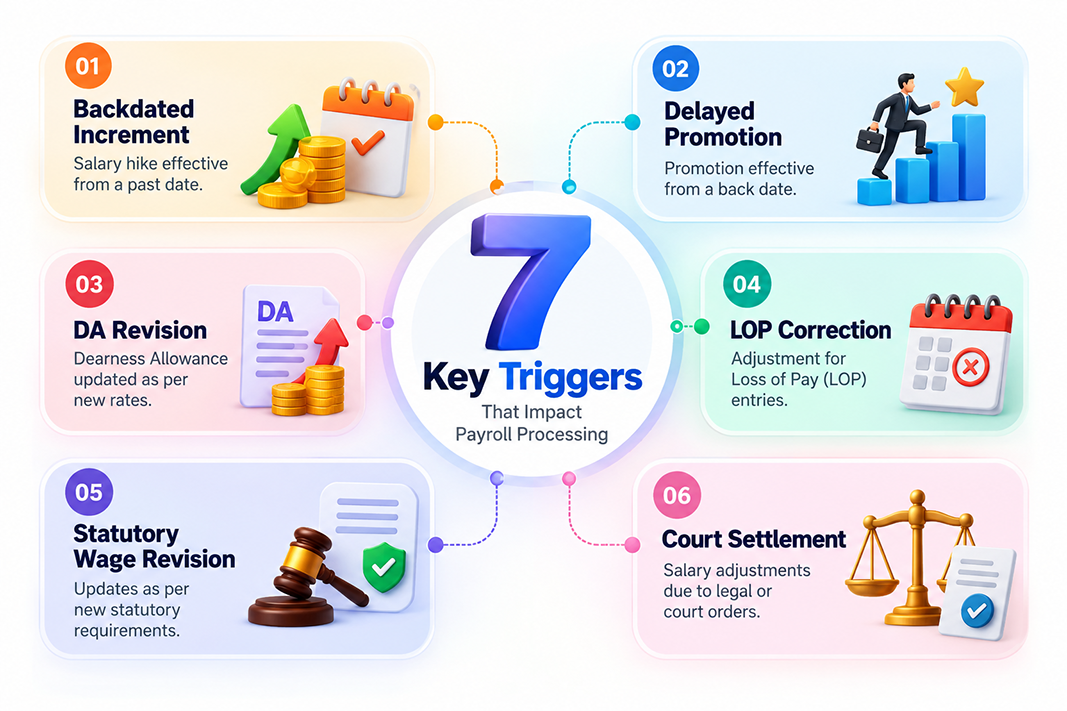
Arrears aren't errors—they're a normal consequence of how salary changes and payroll timing interact. The common triggers:
- Backdated increments—the most frequent cause; appraisals finalized in one month, effective from an earlier date
- Delayed promotions—a promotion (and its higher pay) approved after its effective date
- Salary revisions / pay corrections—a fixed structure corrected retrospectively
- Dearness Allowance (DA) revisions—common in government and PSU pay, revised with retrospective effect
- Wrongly processed LOP—a loss-of-pay day marked in error and reversed the next cycle
- Minimum wage or statutory revisions—a mandated wage revision effective from a past notification date
- Settlement or award payments—arrears ordered under a court ruling or wage settlement
Whatever the trigger, the calculation logic is the same: find the gap between the old and new for the affected period, and pay it.
How to Calculate Salary Arrears: Formula & Worked Example
The core formula is simple:
Salary Arrears = (New Salary − Old Salary) × Number of months (or days) in the arrear period
Here's the step-by-step method with a full worked example.
The Scenario
An employee's monthly salary is revised from ₹40,000 to ₹50,000, effective 1 April 2026. Because appraisals were finalized late, the revision is processed in the July 2026 payroll. So the employee was underpaid for April, May and June—three months of arrears.
Step 1: Find the monthly difference
New salary − Old salary = ₹50,000 − ₹40,000 = ₹10,000 per month
Step 2: Count the arrear period
April, May, June = 3 months (the revision is effective 1 April; July onward is paid directly at the new rate).
Step 3: Calculate total arrears
Monthly difference × months = ₹10,000 × 3 = ₹30,000
Step 4: Add to the current cycle
July payslip = July salary (₹50,000) + Arrears (₹30,000) = ₹80,000 gross for July
| Month | Should Have Been Paid | Actually Paid | Arrear |
|---|---|---|---|
| April 2026 | ₹50,000 | ₹40,000 | ₹10,000 |
| May 2026 | ₹50,000 | ₹40,000 | ₹10,000 |
| June 2026 | ₹50,000 | ₹40,000 | ₹10,000 |
| Total arrears | ₹30,000 |
Mid-month effective dates: If a revision takes effect mid-month (say, 15 April), calculate that month on a per-day basis (difference ÷ total days in month) × applicable days, rather than treating it as a full month.
Don't forget the statutory recalculation: Arrears increase the wage base for the affected months, so PF, ESI (if within the wage threshold), and Professional Tax may need proportionate adjustment, not just the basic gap. And because the new labour codes redefined "wages," make sure arrears are computed on the correct components.
Salary Arrears in the Payslip: How Payroll Processes Them
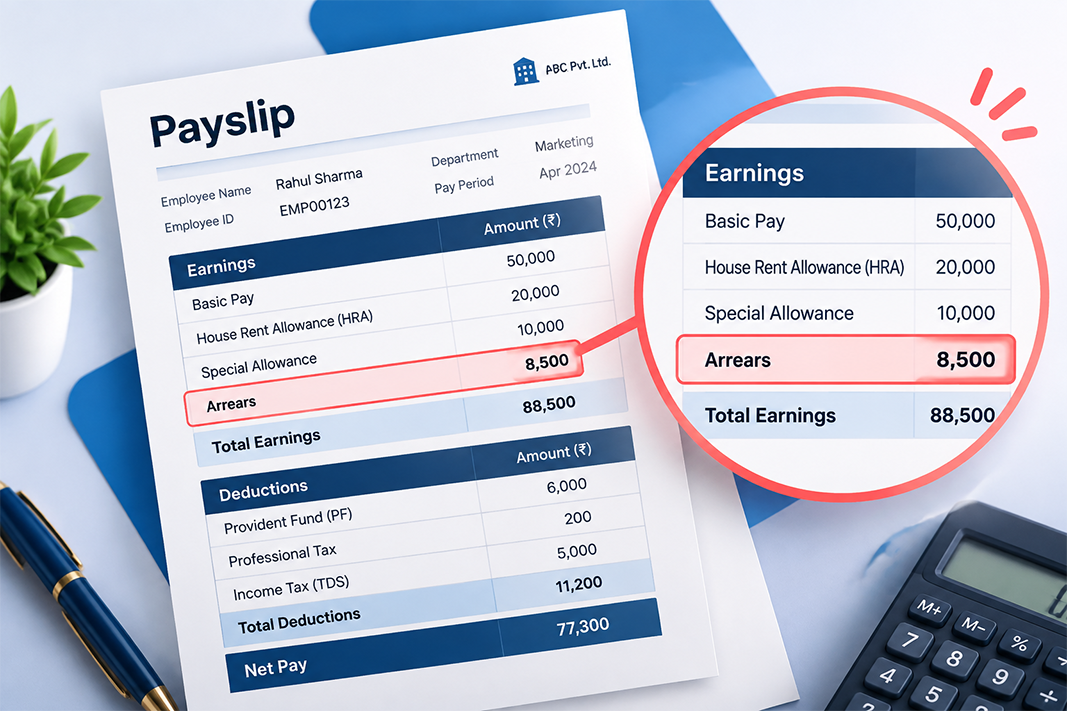
Arrears should appear as a separate, clearly labelled line item on the payslip—typically "Arrears" or "Salary Arrears"—not silently merged into the month's basic pay. Why this matters:
- Transparency—the employee sees exactly what the extra amount is and stops worrying it's a mistake
- Auditability—a distinct arrear line makes reconciliation and any future query easy
- Correct tax handling—arrears are taxed in the year of receipt, so they must be identifiable
A good payslip shows the current month's earnings, a separate arrears line with the period it covers, and the recalculated deductions, so the employee can trace every rupee. This ties directly into your payroll input checklist: backdated revisions are a compensation-change input that must be caught before the run.
Tax on Salary Arrears: TDS and Section 89(1) Relief
This is the part that generates the "why so much tax?" message, so HR should understand it well enough to explain it.
Why arrears feel over-taxed
Arrears are taxed on a receipt basis—the entire ₹30,000 is added to the current year's income and taxed this year, even though it relates to earlier periods. Because it's clubbed into one year, it can push the employee into a higher effective tax bracket for that year, and the employer deducts TDS on it in the month it's paid. That's why the July payslip shows a larger-than-usual tax deduction.
The remedy: Section 89(1) relief via Form 10E
To prevent employees from being unfairly taxed for the bunching of past income into one year, the Income Tax Act provides relief under Section 89(1). In essence, it recalculates tax as if the arrears had been received in the years they actually relate to, and gives the employee the difference as relief.
Key points every HR team should know:
- Form 10E is mandatory. The employee must file Form 10E on the income tax e-filing portal before filing their ITR. Claiming Section 89(1) relief without filing Form 10E first gets the relief disallowed via a Section 143(1) intimation.
- Available under both regimes. Section 89(1) relief can be claimed under both the old and new tax regimes—it's a recalculation of tax already owed, not a deduction that the new regime restricts.
- Pick the right assessment year. On Form 10E, select the AY of the year the arrears were received, not the year they relate to. Arrears received in FY 2025-26 → AY 2026-27.
- Relief is one-directional. It only ever reduces tax; if spreading the arrears back wouldn't have lowered tax (because prior-year income was already high), no relief results.
A 2026 update worth knowing
For FY 2025-26 (AY 2026-27), the returns being filed now, relief is claimed under Section 89(1) using Form 10E, as always. But under the new Income-tax Act, 2025 (in force from 1 April 2026), for Tax Year 2026-27 onward, the same relief moves to Section 157(1) and Form 10E is replaced by Form 39. The calculation logic is unchanged—only the section number and form name differ. Employees receiving arrears in the current year should be directed to this so they file the right form.
This section is general information, not tax advice—employees should confirm their specific position with a qualified tax professional. See also our guides to Form 16 and the old vs new tax regime.
5 Salary Arrears Mistakes HR Should Avoid
- Merging arrears into basic pay—no separate line means confused employees and messy audits
- Forgetting the statutory recalculation—paying only the salary gap and ignoring the PF/ESI/PT impact
- Wrong effective-date maths—treating a mid-month revision as a full month instead of pro-rating
- Not flagging the tax impact—employees blindsided by high TDS with no explanation of Section 89(1) relief
- Manual, one-off calculations—computing multi-month, multi-employee arrears by hand, where a single wrong cell cascades
How Payroll Software Handles Salary Arrears Automatically

Arrears are a textbook case of work that's tedious and error-prone by hand and instant by system. Integrated payroll software handles the whole chain:
- Automatic arrear calculation—enter a backdated effective date and the system computes the month-by-month (or day-by-day) difference across all affected periods, for one employee or a whole department at once
- Statutory auto-recalculation—PF, ESI, and state-wise Professional Tax on the arrear amount are recomputed automatically, not left to manual adjustment
- Clean payslip presentation—arrears show as a distinct, labelled line with the period covered, so employees see exactly what they're paid
- Correct TDS on receipt—tax on arrears is applied in the month of payment and reflected accurately in Form 16 and the 24Q return
- Full audit trail—every backdated revision and the arrears it generated is logged with dates and approver
Instead of building an arrears spreadsheet each appraisal season, HR sets the effective date once, and the calculation and its statutory ripple effects are handled correctly every time.

Conclusion
Salary arrears calculation comes down to one simple idea: pay the gap between the old and new salary for the period the change applies to, plus two things HR must not forget: recalculate the statutory deductions, and explain the Section 89(1) tax relief so employees aren't spooked by a heavy-TDS month. Get those right and a backdated increment stays what it should be: good news.
Found this useful? Share it with your payroll team before the next appraisal cycle, and with the colleague who still builds the arrears sheet by hand every July.
Frequently Asked Questions (FAQs)
Q1. What are salary arrears?
Salary arrears are amounts owed for a past period paid in a later payroll cycle, usually because a salary increase or correction took effect from an earlier date than it could be processed. It's essentially back pay for the gap.
Q2. How are salary arrears calculated?
Multiply the difference between the new and old salary by the number of months (or days, for mid-month changes) in the arrear period. For example, a ₹10,000/month raise effective three months earlier produces ₹30,000 in arrears, added to the current month's pay.
Q3. Why is tax so high in the month arrears are paid?
Arrears are taxed on a receipt basis, so the full amount is added to the current year's income and TDS is deducted that month. This can temporarily push the employee into a higher effective bracket, which is exactly what Section 89(1) relief is designed to offset.
Q4. How does an employee claim relief on salary arrears?
By filing Form 10E on the income tax e-filing portal before filing their ITR, to claim relief under Section 89(1). The relief recalculates tax as if the arrears had been received in the years they relate to. For arrears received from 1 April 2026, this moves to Section 157(1) and Form 39 under the Income-tax Act, 2025.
Q5. Should salary arrears be shown separately on the payslip?
Yes. Arrears should appear as a distinct, clearly labelled line item with the period they cover—not merged into basic pay—for transparency, easy auditing, and correct tax treatment.