Summary
Payroll gets processed. Salaries go out. And then someone in HR notices, a day too late, that an employee's salary revision never made it into the run. Or the overtime number on the payslip doesn't match what the attendance system logged. It happens more often than most teams admit, and it's rarely because anyone was careless. It's because there was no final check before the money moved.
That check is payroll reconciliation. It's the step where HR and finance sit down with the payroll output and ask, essentially, "does this actually match what it's supposed to?" Skip it, and small data mismatches turn into salary corrections, awkward conversations with employees, and rework nobody has time for.
This guide covers what payroll reconciliation actually means, why growing companies can't really skip it, and how to build a process around it that holds up month after month, not just when someone remembers to double-check.
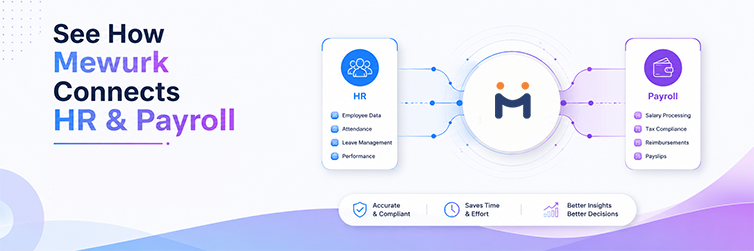
What Is Payroll Reconciliation?
Payroll reconciliation is the process of comparing payroll data against source records, such as employee information, attendance, leave, salary changes, and deductions, to identify and resolve discrepancies before payroll is finalized.
Payroll processing does the math. Reconciliation checks whether the math was fed the right numbers in the first place.
In a typical setup, someone from HR, payroll, or finance pulls the payroll output once inputs are locked in and lines it up against the records that fed into it. Did the person who joined on the 15th get included? Is the employee who resigned last month still showing up as active? Does the overtime figure match what was actually approved?
Who runs this varies by company. In a five-person HR team, it might be one person's end-to-end job. In a larger setup, it's split: someone prepares the numbers, someone else signs off.
It happens after inputs are collected, before the run is approved. And it matters for a fairly obvious reason: payroll software will calculate exactly what it's told, correctly, every time. If the input going in is wrong, so is the output. No system fixes that on its own.
Why Is Payroll Reconciliation Important?
The whole point of reconciliation is timing, catching a mistake while it still costs nothing to fix, instead of after salaries have already gone out. Once money moves, correcting it means an off-cycle payment, an adjustment buried in next month's payslip, or an uncomfortable conversation with an employee who noticed before you did.
A reasonably careful reconciliation step tends to surface things like:
- Salary inputs that are just wrong
- A revision or increment that never got applied
- Attendance numbers that don't match the source system
- Leave deductions that were missed or applied incorrectly
- Overtime figures that don't line up with what was approved
- The same employee showing up twice in the system
- Deductions that are off, or applied to the wrong person
- Someone marked active who actually exited weeks ago
- A payroll total that just looks off, compared to last month
For HR, this means fewer angry emails after payday. For finance, it means books that hold up when someone actually looks closely at them, during an audit, for instance. For employees, it's the difference between getting paid correctly the first time and having to ask for a correction. And for leadership, it means the payroll numbers in a monthly report can actually be trusted.
None of this needs fancy tooling. It needs someone treating the check as non-negotiable every cycle, not just when there's time for it.
Payroll Reconciliation vs Payroll Processing
People use these two terms as if they're the same thing. They're not, and mixing them up is part of why reconciliation gets skipped. Teams think it already happened because payroll "was processed."
| Payroll Processing | Payroll Reconciliation |
|---|---|
| Calculates payroll | Verifies payroll inputs and results |
| Applies salary rules and formulas | Checks whether the underlying data is accurate |
| Calculates deductions | Identifies discrepancies in those deductions |
| Produces payroll output | Confirms that output is correct before approval |
If processing is the engine, reconciliation is the person checking the dashboard before you actually drive off. Both matter. Only one of them tells you if something's wrong.
What Data Should Be Reconciled Before Payroll?
Before a payroll run gets signed off, there's a handful of things worth checking every single time.
Employee Master Data
Name, employee ID, joining date, current employment status, department, designation. Sounds basic, but this is where a surprising number of errors originate. Someone who exited three weeks ago is still marked active, or a transfer between departments never got updated.
Salary Data
Basic salary, allowances, any variable pay components, and recent revisions. If an increment was approved verbally or over email and never entered into the system, this is where it falls through.
Attendance Data
Present days, absences, total hours worked, overtime, and, where it applies, late arrivals or short-hour instances.
Leave Data
Approved leave for the period, unpaid leave, whatever leave deductions were applied, and current leave balances.
Payroll Deductions
This usually covers things like Provident Fund, ESIC, Professional Tax, and TDS, along with anything else specific to the company or employee. One caveat worth taking seriously: statutory rates and thresholds change, and they're not identical across states or employee categories. Don't lock in a fixed number here without checking it against a current, official source or your compliance advisor. Getting this wrong isn't a minor slip.
Payroll Reconciliation Process: Step by Step
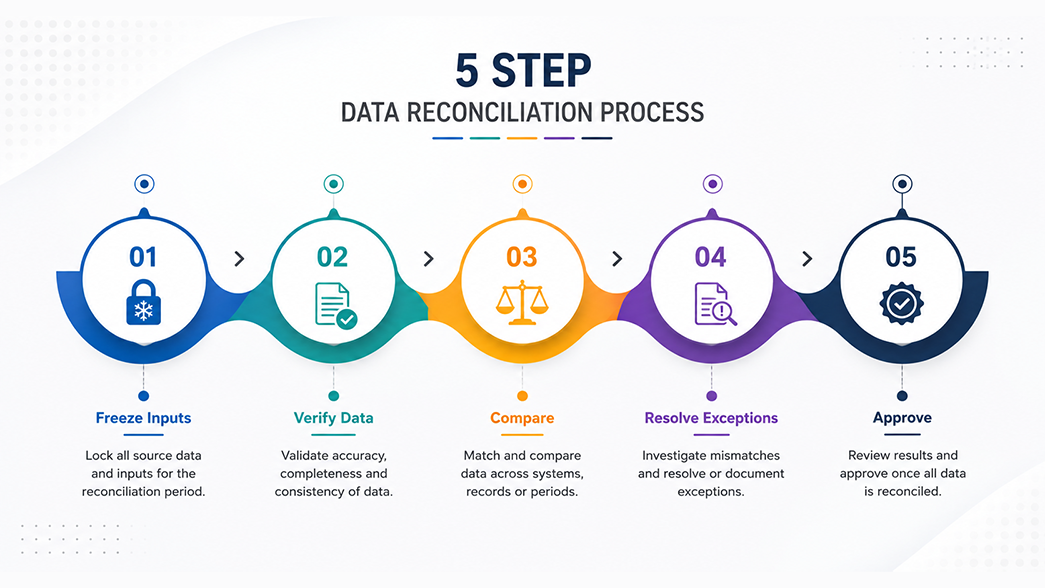
This is really the core of it, a sequence a team can run the same way, every cycle, without reinventing it each time.
Step 1: Freeze payroll inputs
Pick a cut-off date and hold to it. Anything that comes in after, a late attendance correction, a leave approval, a salary change request, gets pushed to the next cycle. Without a hard freeze, you're trying to reconcile against numbers that keep shifting under you.
Step 2: Verify employee master data
Go through new joiners, exits, transfers, and any status changes for the period. This step alone catches a lot: a new hire missing entirely, or someone who left the company still sitting on the payroll list.
Step 3: Reconcile attendance
Pull the attendance report and check it against what's actually loaded into payroll. Present days, absences, total hours, these should match exactly, not roughly. If attendance and payroll aren't connected systems, expect this to be manual and a little tedious.
Step 4: Verify leave data
Confirm approved leave shows up correctly and unpaid leave has actually been deducted. Anything approved after the freeze date shouldn't sneak into this cycle.
Step 5: Check salary changes
Walk through every increment, promotion, or role change approved for the period, and confirm each one made it into the payroll input, not just into an approval email that never got acted on.
Step 6: Verify overtime and variable pay
Compare approved overtime hours and variable pay (bonuses, incentives, whatever applies) against what payroll actually shows. Overtime that's estimated rather than approved is one of the more common sources of disputes.
Step 7: Check deductions
Confirm statutory and other authorised deductions are correct: right employee, right amount, right period. Small errors here compound quickly across a large team.
Step 8: Compare against the previous period
Look at this cycle's payroll total next to last month's. If a department's cost jumped 20% and there's no obvious reason, no new hires, no bonus cycle, that's worth chasing down before approval, not explaining afterward.
Step 9: Put together a reconciliation report
Document what came up: expected value, payroll value, the difference, why it happened, and how it was resolved. This becomes your reference point the next time something similar shows up, and it usually does.
Step 10: Final review and approval
Once the exceptions are cleared, someone with sign-off authority, a payroll manager, a finance controller, whoever that is at your company, approves the run. Do this even when everything looks clean. It's the last check before the money actually leaves.
Payroll Reconciliation Checklist
Print this, save it, put it in a shared doc, whatever gets it used every cycle.
Keep a copy from each cycle. A few months in, it turns into a genuinely useful record of what's been checked, and by whom.
Common Payroll Reconciliation Errors
Ten patterns show up again and again. Most teams will recognize at least half of these.
- Salary revision not updated. HR approves a raise, but it never reaches payroll in time. The employee gets underpaid and needs a correction next cycle. Fix: set a hard deadline for salary changes before the payroll cut-off.
- Incorrect attendance input. Usually a manual entry slip, or a sync issue between attendance and payroll. Fix: cross-check totals against the source system before finalising, not after.
- Missing unpaid leave. Leave gets approved late, or the information never reaches payroll, so the employee is paid for days they did not work. Fix: align leave approval deadlines with the freeze date.
- Incorrect overtime. OT calculated from an estimate instead of an actual approval, leading to overpayment, underpayment, or a dispute. Fix: require manager sign-off on OT before it is entered.
- Duplicate employee record. Happens most often with re-hires or a data entry mistake creating a second profile. Fix: run a duplicate-ID check before every cycle.
- Incorrect employee status. An exit does not get updated on time and the person still gets paid after leaving. Fix: sync exit dates between HR and payroll the same day, not at month-end.
- Wrong deduction input. A manual entry error, or a deduction slab that is out of date. Fix: check deduction data against current verified rates every cycle.
- New joiner missing from payroll. Onboarding finishes after the freeze date, so the person is not included and does not get paid on time. Fix: set an onboarding deadline before the freeze.
- Exited employee included incorrectly. Final settlement is not processed, or the exit date was not applied properly, leading to an overpayment that must be recovered. Fix: treat exit processing as part of the payroll checklist.
- Payroll total does not match expectations. Could be any of the above, or a straightforward calculation error. Fix: always compare the current total with the prior cycle before signing off.
Payroll Reconciliation Example
Note: the numbers below are made up for illustration only. They're not real payroll data or industry figures.
Take an employee with a fixed monthly salary, a bit of approved leave, some overtime, and a recent revision that was supposed to go through. Here's roughly what HR would be comparing:
| Payroll Input | Source Record | Payroll Value | Difference | Action |
|---|---|---|---|---|
| Salary | ₹45,000 | ₹42,000 | ₹3,000 | Review, revision not applied |
| OT | 6 hours | 6 hours | 0 | Verified |
| Leave | 1 day unpaid | 0 days deducted | 1 day | Correct before approval |
Two problems show up here: the salary revision didn't get applied, and an unpaid leave day was missed entirely. Neither is a huge deal on its own, but both need fixing before this run gets approved. That's the whole exercise, really: catching exactly this kind of thing before it becomes a payslip someone has to question.
Payroll Reconciliation for Indian SMEs

Payroll is simple until it isn't. Twenty people on a spreadsheet, one office, one pay structure, manageable. A hundred and fifty people spread across departments, maybe two cities, with a mix of shift workers and salaried staff? That's a different animal entirely, and most SMEs hit this wall faster than they expect.
Growth tends to bring along:
- Different pay structures across departments
- More than one branch, sometimes in different states
- Headcount that keeps climbing
- Variable pay tied to targets or performance
- Overtime that differs by role and by shift
- Employees on rotating shift schedules
- A steady stream of attendance corrections
- New joiners and exits, constantly
- Payroll still being tracked in spreadsheets, because nobody's had time to change that
Each of these is one more place an error can hide. A mistake in a single spreadsheet might affect one employee. The same gap, repeated across three departments and two cities, affects a lot more people, a lot faster. That's really the argument for reconciliation as complexity grows. It's not extra process for its own sake; it's what keeps payroll trustworthy once a business outgrows the "everyone knows everyone" stage.
Excel vs Payroll Software for Reconciliation
Plenty of SMEs start in Excel. Nothing wrong with that. The real question is what happens once the team outgrows it.
| Area | Excel | Payroll Software / HRMS |
|---|---|---|
| Data Entry | Manual | More automated |
| Attendance Inputs | Manual or import-based | Connected workflows |
| Leave Data | Manual | Workflow-based |
| Salary Changes | Manual updates | Centralized records |
| Error Detection | Manual checks | Reports and validation tools |
| Reporting | Manual | Automated reports |
| Auditability | Depends on how disciplined the process is | System-based tracking |
| Scalability | Gets harder past a certain size | Built for growing teams |
Excel is genuinely fine when one person is managing 15 people and has a reliable personal habit of double-checking everything. The trouble starts as headcount and locations multiply, because at that point the checks depend entirely on someone remembering to do them, and eventually, someone won't.
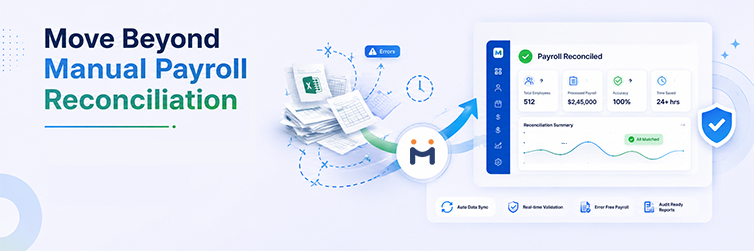
How HRMS Can Simplify Payroll Reconciliation
An HRMS won't make reconciliation unnecessary. What it can do is cut down how much of it you're doing by hand by keeping the systems that feed into payroll actually connected.
The flow, ideally, looks like this: Employee Data → Attendance → Leave → Payroll → Reports.
When these pieces talk to each other instead of living in five separate files, a lot of the manual cross-checking just goes away. Mewurk, for instance, brings together:
- Centralized employee records, so payroll isn't working off a list that's two weeks out of date.
- Attendance management, where the data flows straight into payroll instead of being typed in twice.
- Leave management, with approvals and balances that update on their own, which cuts down on missed unpaid-leave deductions specifically.
- Payroll, calculated directly from the connected data above rather than a separate import.
- Shift scheduling, which matters a lot for teams juggling rotating shifts, where manual attendance tracking gets messy fast.
- Employee self-service, so employees can check their own attendance and leave and flag something before it even reaches payroll.
- Reports and analytics for comparing payroll across cycles without rebuilding a report from scratch every month.
- HR workflow automation, so leave, overtime, and salary changes follow a proper process instead of an email that might get missed.
To be clear about the limits here: no software catches everything. Someone still needs to look at the final numbers and ask if they seem right. What a connected system mostly does is remove the data-entry mistakes and missed updates that come from managing the same information across too many spreadsheets.
Payroll Reconciliation KPIs HR Teams Should Track
Hard to improve something you're not actually watching. A few numbers worth tracking each cycle:
- Payroll correction requests after disbursement
- Reconciliation exceptions found per cycle
- How long payroll takes, start to approval
- Attendance correction requests
- Salary revision errors caught during reconciliation
- Volume of employee payroll queries
- Manual adjustments needed
- Time spent specifically on reconciliation itself
There's no industry-wide benchmark that's actually useful here. Team size, industry, and how mature the process already is all change what "normal" looks like. What works better is watching your own numbers over three or four cycles and checking the direction. Fewer exceptions, faster turnaround, that's the process improving, regardless of what anyone else's numbers look like.
How Often Should Payroll Reconciliation Be Done?
Before every single payroll run. Non-negotiable. This is the final check before money moves, every cycle, no exceptions.
Monthly, if that's your pay cycle. Reconciliation should follow the same rhythm as disbursement. Weekly or bi-weekly payroll means weekly or bi-weekly reconciliation.
After anything unusual, even outside the regular schedule:
- A batch of salary revisions
- Hiring a lot of people at once
- Restructuring
- Opening a new location
- A policy change that affects pay
There's no law in India mandating a specific reconciliation frequency. It's a business practice, not a compliance requirement. That said, treating it as optional tends to be how the compliance and accuracy problems it's supposed to catch actually slip through. Safer to just build it into every cycle as a fixed step.
Payroll Reconciliation Best Practices
A handful of habits separate a reconciliation process that actually holds up from one that quietly gets skipped when things get busy:
- Pick a fixed payroll cut-off date and don't move it around
- Keep one employee master record, not three versions across three files
- Write payroll policies down clearly, so there's nothing to argue about during a check
- Split preparation and approval where team size allows it
- Track exceptions rather than fixing them quietly and forgetting about them
- Keep an audit trail every cycle, not just when someone asks for one
- Look closely at anything that changed a lot month over month
- Reconcile before disbursement, never after
- Hold onto supporting documentation for every approved change
- Automate the repetitive parts wherever that's realistic
None of this requires a system overhaul. Most of it just needs a checklist and the discipline to actually use it.
Payroll Reconciliation Audit Trail
Good records turn a stressful audit into a mildly annoying one instead. At minimum, hold onto:
- Payroll input records for each cycle
- Approved salary revision documents
- The attendance data actually used in that run
- Leave approval records
- Overtime approvals
- Deduction records
- Reconciliation reports
- Notes on how each exception got resolved
- Final payroll approval sign-off
Keep these consistently, and answering a question from an auditor, or an employee, takes a few minutes instead of an afternoon spent digging through old folders.
Frequently Asked Questions
What is payroll reconciliation?
It's the process of comparing payroll data against source records, attendance, leave, salary changes, deductions, before payroll gets finalized. It's a check, not a calculation step, meant to catch mistakes before anyone gets paid the wrong amount.
Why is payroll reconciliation important?
Because it catches problems while they're still cheap to fix. Skip it, and errors like a missed salary revision only show up after payment, which means corrections, complaints, and extra work that didn't need to happen.
What is included in payroll reconciliation?
Employee master data, salary details, attendance, leave, overtime, and applicable deductions, all checked against what payroll actually calculated for that cycle.
How does payroll reconciliation work?
Inputs get frozen at a cut-off date, then each data category, attendance, leave, salary, deductions, gets compared against the payroll run. Anything that doesn't match gets flagged, investigated, and fixed before approval.
Who is responsible for payroll reconciliation?
Usually HR, payroll, or finance, depending on how the company's set up. Small teams often have one person doing it start to finish; larger ones tend to split preparation and final sign-off.
How often should payroll be reconciled?
At minimum, before every run. Most companies do this monthly, matched to their pay cycle, plus extra checks after events like bulk hiring or a round of salary revisions.
What are common payroll reconciliation errors?
Missed salary revisions, attendance mismatches, wrong overtime figures, unpaid leave that didn't get deducted, duplicate employee records, and exited employees still showing up in the run.
Is payroll reconciliation the same as payroll processing?
No. Processing calculates pay based on the data it's given. Reconciliation checks whether that data, and the resulting numbers, are actually correct before anything gets approved.
Can payroll reconciliation be done in Excel?
Yes, and a lot of small teams do exactly this. It works fine at a smaller scale but gets harder to trust as headcount and complexity grow, since every check depends on someone remembering to run it manually.
How does HRMS help with payroll reconciliation?
It connects employee, attendance, leave, and payroll data, which cuts down on manual re-entry and the mistakes that come with it. It doesn't remove the need for a human to review the final numbers, but it shrinks how much needs checking by hand.
What is a payroll reconciliation report?
A document that lists the expected value, the actual payroll value, the difference between them, why it happened, and how it got resolved. Useful in the moment, and useful again the next time it comes up.
How do you reconcile attendance with payroll?
Compare present days, absences, and hours from the attendance system against whatever's entered into payroll. Any gap gets traced back to its cause, a late update, a sync issue, a manual typo, before the run is approved.
How do you reconcile salary revisions?
Check the list of approved increments or role changes against what's actually reflected in that cycle's payroll input. Anything approved after the freeze date should wait for the next cycle, not get forced into this one.
What should be included in a payroll reconciliation checklist?
At minimum: employee master data, salary changes, attendance, leave, overtime, deductions, bank details, a comparison to the last cycle, exception tracking, and a final sign-off step.
Can payroll software reduce manual reconciliation work?
Generally, yes. Connecting attendance, leave, and employee data to payroll reduces the manual cross-checking and reconciliation that would otherwise be required. It won't remove the need for a review, but it narrows what actually needs to be checked by hand.
Key Takeaways
- Payroll reconciliation is a verification step before payroll is finalised. It's not the same thing as payroll processing.
- HR and finance should compare payroll output against employee, attendance, leave, and salary data every single cycle.
- Doing this regularly catches mistakes before they reach an employee's payslip, not after.
- A written checklist keeps the process consistent, even as the people running it change.
- HRMS platforms can cut down on repetitive manual work by connecting data sources. Human review still matters, though.
- SMEs are better off tracking their own reconciliation exceptions and correction time than chasing generic benchmarks.