15 Everyday HR Tasks You Can Manage with an HRMS Mobile App
Summary
Discover how an HRMS mobile app helps HR teams, managers, and employees complete everyday tasks without relying on a desktop. This guide covers 15 practical use cases, essential design features, rollout tips, buying criteria, and what to look for when choosing a mobile-first HRMS for your business.
A recent social media ad by a tech startup was this. "Your office is no longer a place. It's in your pocket." While these kinds of slogans are used by all types of companies these days, it sums up where HR is headed. If you're an HR decision-maker or entrepreneur managing field teams, hybrid staff, and compliance deadlines, the question is not if you need mobile HR, but what you can get done on it.
This blog breaks down 15 real tasks HR can finish on an HRMS Mobile App without touching a laptop. You will also find definitions, examples, data-backed benefits, design tips, and a snapshot of the Mewurk HRMS mobile app. Our goal is to help you decide what to expect from an HRMS mobile app. Let's get into it.
What Is an HRMS Mobile App?
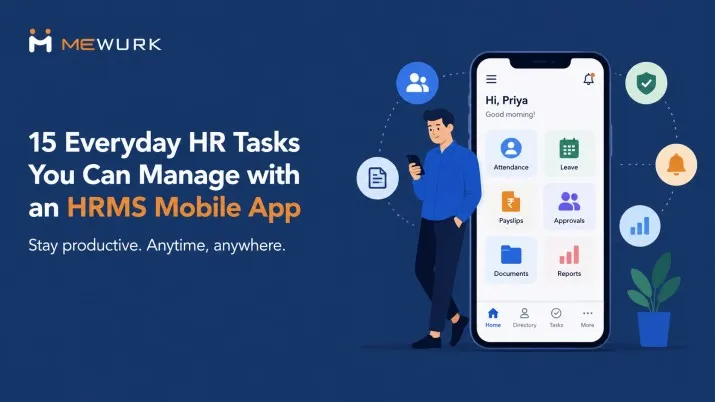
An HRMS Mobile App is a smartphone version of your Human Resource Management System. It lets HR teams, managers, and employees handle core HR workflows from anywhere. Core modules include geo-tagged attendance, leave management, payroll and payslips, employee directory, notifications, and updates. For remote or field staff, it replaces the need to depend on Excel sheets, emails, and paperwork with real-time, self-service access.
Why HR Leaders Are Switching to Mobile First?
HRMS Mobile App adoption is driven by three realities:
- Speed: Apps like Mewurk HR let HR close 50+ HR tasks in just 3 clicks, with zero emails on one screen.
- Field reality: Real-time attendance punching, instant data verification, and on-the-go approvals keep textile units in Ahmedabad and remote sales teams running.
- Employee experience: Self-service tools empower workers to manage HR needs independently and give 24/7 access to contracts, leave balances, and benefits.
If your team still has to log into a desktop for leave requests and approvals, you are letting them waste hours weekly. A 2026 study by Mewurk HR software research and development team found that HR teams save up to 7 hours weekly per member on onboarding alone with mobile-first HRMS.
15 Things HR Can Do on an HRMS Mobile App Without a Laptop
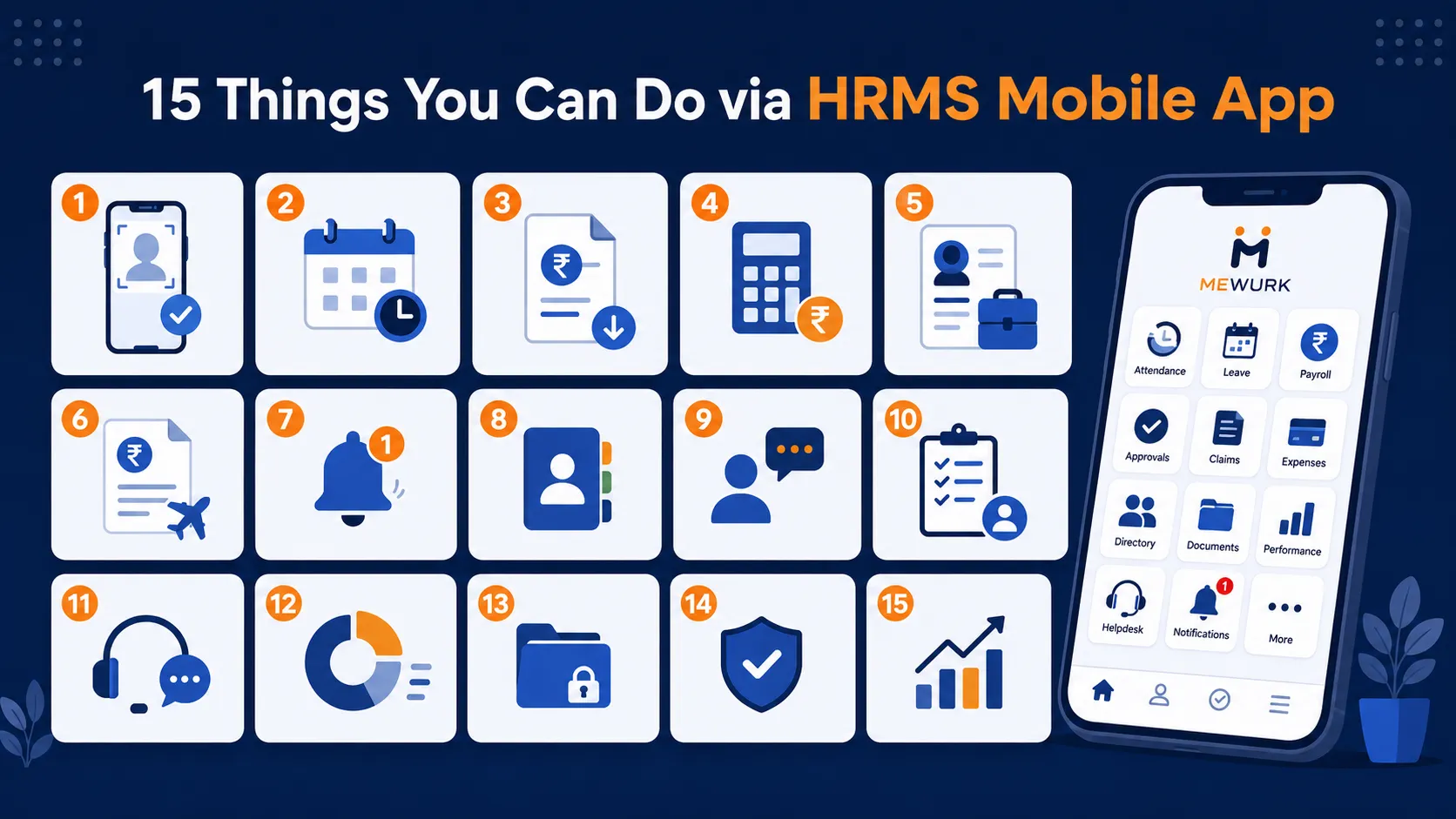
1. Let Employees Mark Attendance from Anywhere
Perhaps the most used feature on an HRMS mobile app could be attendance marking. You can let employees check in right from their phones. Now with remote work becoming common, you cannot always have your employees clock in through a biometric attendance system installed at the office. Also, clocking in via a web portal is not always practical for the field team. HRMS mobile app suits all types of workforce styles.
2. Process Leave Requests End-to-End
Using the HRMS Mobile App, employees can apply leave in seconds. They don't require any forms or emails. Likewise, managers can get instant push notifications and approve from anywhere. They can update the balances automatically. In simple terms, the mobile app for HRMS removes the endless follow-up loop.
3. Generate & Share Payslips Instantly
ESS modules within the mobile give employees faster access to payslips and Form 16. With Mewurk HRMS, you have smart and straightforward option to view and download payslips on mobile. Digital payslips come with real-time payroll notifications.
4. Run One-Click Payroll Processing
You verify attendance right in the app, then process payroll with a single tap. Employees get instant "Salary Credited" notifications, and you skip the spreadsheet marathon. That means fewer errors, fewer follow-ups, and a calm month-end for you.
5. Handle Recruitment & Onboarding on the Go
Post jobs, screen applicants, and roll out offer letters from your phone. You can specify job requirements down to years and months of experience, approve new hire documents, and trigger onboarding checklists. Your new employees start day one without waiting on HR to get to a desk.
6. Manage Claims, Travel & Expenses in One Flow
You snap a receipt, submit a claim, and route it for approval. A well-integrated HRMS Mobile App will have travel requests, advances, and reimbursements all live in the same. You can track status in real time. There is no need of asking, 'did you get my bill?'
7. Push Real-Time Notifications & Alerts
Another attractive side of a modern HRMS employee mobile app is the convenience of getting up to date and in sync via notifications and alerts. Whenever there are approvals, policy updates, birthdays, document expirations, you can receive instant push alerts. Your managers and employees will stay in sync without endless email threads.
8. Find Anyone in Your Company in Seconds
Modern HRMS mobile app design incorporates an employee directory. If you or one of your employees needs to contact someone in your company, say when you need to call a team lead during a client visit, you can tap into the directory to pull up contact details, reporting lines, and location. You have the number and org chart right there.
9. Conduct Exit Interviews & Offboarding
You can conduct exit interviews and offboarding smoothly through the mobile app. Initiate an exit checklist to collect company assets back from the employee. Carry out the full and final settlements, and capture exit feedback directly in the app. The mobile app helps you make the separation smooth for both sides.
10. Assign Tasks & Track Performance Remotely
On the HRMS app, you can set goals, review updates, and share feedback. Some innovative apps like Mewurk have even included performance dashboards to help stakeholders see who's on track and who needs support. As an HR, you need to make decisions based on data. The mobile version of the HRMS makes that pretty fast.
11. Solve Employee Queries With a Mobile Help Desk
In the traditional HR setup, your employees had to go through so much struggle and headache to raise HR tickets. Now with the mobile app, you can let employees do it from their smartphone. They don't even have to walk to your desk. After the tickets are raised, you can track, respond, and close queries on the same app. That cuts a lot of repeat questions and keeps your day focused on strategy.
12. Stay Compliant With GPS & Biometric Punch Options
If you are a company with field teams, attendance marking needs more than a clock-in or clock-out record. You might want to verify the employee's location and ensure they are clocking in from where they are supposed to be. With GPS-based check-ins, selfie verification, and biometric punch options now available on the HRMS employee mobile app, you can know exactly where and when employees clock in.
13. Store & Retrieve Documents With Expiry Alerts
Every HR team has gone through the last-minute rush for passport copies, licence renewals, or tax documents. Instead of digging through emails and folders, you can securely store employee documents in the HRMS mobile app and set automatic expiry reminders for critical records. Employees can also download payslips, tax documents, and other files themselves.
14. Use Real-Time Dashboards to Decide Faster
Just like you can enable several actions on the HRMS employee mobile app, you can get a real-time view of the outcomes of those actions on the same app. For instance, viewing attendance trends, leave patterns, payroll costs, and headcount from visual dashboards. It is also possible to generate reports for leadership without exporting to Excel first.
15. Clear All Approvals From One Inbox
As an HR professional, it's common to receive a stack of approval requests just as you're about to wrap up for the day. Leave applications, attendance regularisations, expense claims, and document approvals pile up across emails and chats. Instead of switching between systems, the HRMS mobile app brings every pending approval into a single inbox. You can review, approve, or reject requests in seconds. Employees on their end would be able to receive updates of those actions.
HRMS Mobile App Design: What Works and Why
Good HRMS mobile app design is not about cramming the web portal into a small screen. Here's what users respond to:
| Design Element | Why It Matters |
|---|---|
| Mobile-First UX | Employees should be able to complete common tasks like attendance, leave requests, and approvals within a few taps. |
| Selfie + GPS Verification | Helps verify attendance for field employees while reducing time fraud and buddy punching. |
| Role-Based Dashboards | Shows HR, managers, and employees only the information and actions relevant to their roles. |
| Offline Mode & Auto Sync | Lets employees continue using the app in low-connectivity areas and syncs data once they're back online. |
| Minimalist Quick Actions | Places frequently used actions like Check In, Apply Leave, and Approvals on the home screen to reduce navigation. |
Before choosing or rolling out an HRMS mobile app, make sure it includes these essentials. They have a direct impact on user adoption, attendance accuracy, and everyday productivity.
The Benefits of an HRMS Employee Mobile App Across Your Workforce
The mobile app version of your HRMS software not only benefits a specific group of people but every stakeholder in the organisation. Take a look at who benefits from the app and how.
For HR Teams
- Quick approvals and task tracking without desktop login
- Reduced manual effort and errors
- 100% data security with Azure, GDPR, ISO27001 in top apps
For Managers
- Approve leave or shifts without logging into desktop
- Monitor availability and performance metrics live
- Get instant notifications, approve from anywhere
For Employees
- Mark attendance remotely
- Apply for leave, view payslips, access Form-16
- Raise requests in seconds, no chasing HR
How to Use an HRMS Mobile App: 5-Step Rollout
- HRMS mobile app download from the App Store or Play Store
- Login using company email or employee ID
- Access modules: attendance, leave, payroll, performance
- Submit approvals with a few taps
- Enable push notifications to stay updated
Pro tip: Pilot with one department. Track time saved on leave and payroll. Then scale.
Choosing the Right HRMS Mobile App: A Practical Checklist
| Essential Features | Useful Additions | Warning Signs |
|---|---|---|
| GPS + selfie attendance | Multilingual interface | Attendance records require manual corrections |
| Leave and payroll in one app | Expense and travel claim management | Core features locked behind extra charges |
| Role-based access and approvals | In-app notifications and reminders | No offline support for field employees |
| Offline attendance with auto-sync | Custom workflows and reports | Limited integration with existing business tools |
| Secure data protection and backups | Employee directory and announcements | Slow performance or an outdated user experience |
| Easy integration with your existing systems | Document access from mobile | Frequent app crashes or poor user ratings |
Mewurk: The Cleanest HRMS Mobile App Experience
If you want simplicity in workforce management with a clean mobile experience without losing control, Mewurk guarantees that. It's an HRMS software known for one of the cleanest, simplest, and finest HRMS Mobile App interfaces in the market.
Mewurk focuses on:
- Clutter-free design: HR, managers, and employees see only relevant actions. There are no endless menus.
- Speed: The app lets you complete leave, attendance, payslip, and approval workflows in 2-3 taps.
- Reliability: Built for Indian as well as global compliance, with GPS, selfie, and biometric options.
- Adoption: The HRMS mobile app experience is intuitive, so even non-tech staff find it comfortable to use daily.
Conclusion
You came here to see what HR can do without a laptop but through HRMS Mobile App. We covered 15 tasks: from GPS attendance and one-tap payroll to exit interviews and real-time dashboards.
Work isn't becoming more desk-bound. It's becoming more mobile, more distributed, and more demanding. The tools your employees use should evolve at the same pace.
Did you find this blog useful? Let's know your thoughts. Also, feel free to pass this along to someone who needs these insights.
FAQ
1. What is an HRMS Mobile App and who uses it?
HRMS mobile app is a smartphone HR system for attendance, leave, payroll, and more. It can be used by all stakeholders in an organisation such as HR teams, managers, and employees.
2. Can I run payroll on a HRMS employee mobile app?
Yes. There are several HRMS apps that allow one-click payroll automation. If you have already added and configured the employee data correctly in the system, you can easily initiate payroll run through the app.
3. Is a HRMS mobile app download free?
Yes, most HRMS providers include their mobile app at no additional cost as part of their paid plans. If you're already subscribed, you should be able to use the app without paying extra. If a vendor charges separately for the mobile app, it's worth reconsidering, as mobile access has become a standard feature of modern HR software.
4. How secure is my HRMS mobile app data?
Top HRMS mobile app vendors like Mewurk use secure data storage options like Azure and maintain GDPR, ISO27001 compliance for data security. Before you go with any provider, it is better to verify encryption and role-based access.
5. What's key in HRMS mobile app design?
A well-designed HRMS mobile app should be built for mobile first, not adapted from a desktop interface. Employees should be able to complete everyday tasks like marking attendance, applying for leave, or checking payslips in just a few taps. The simpler and more intuitive the experience, the more likely employees are to use the app consistently.
Most Popular Post
Why Accurate Attendance and Leave Management Matters for Business Growth?
Read More →Why Accurate Attendance and Leave Management Matters for Business Growth?
How To Leverage Attendance Data For Better Workforce Management?
Read More →How To Leverage Attendance Data For Better Workforce Management?