Summary
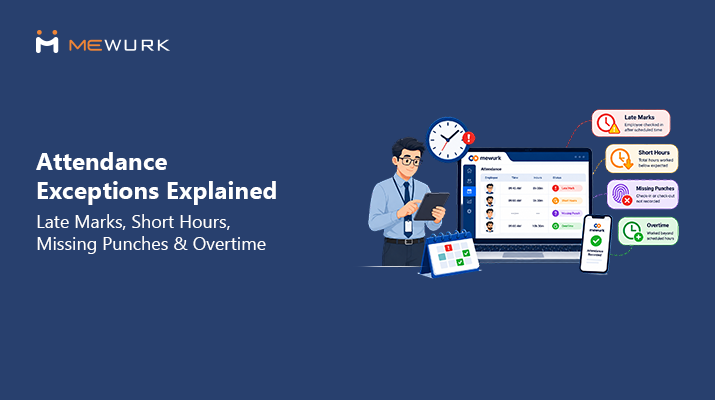
Attendance exceptions like late marks, short hours, missing punches, and overtime can add to the workload for HR and payroll teams. This article looks at how HR teams can manage these issues, manage regularization and approval requests, and use attendance data for payroll. The article also looks at workflows for teams working in shifts or across locations, and how software can simplify attendance tracking and maintain accurate attendance records.
Introduction
An employee misses their punch-out before leaving work. Another arrives twenty minutes late; their shift starts. Someone records fewer hours than their scheduled hours, and a fourth person works late to finish a task, but there is no record of any of the extra hours being approved.
None of this is unusual. HR and payroll teams may deal with several attendance issues during the same week. Late marks, missing punches, short hours, and overtime can all appear in the attendance record.
These situations fall under what's generally called attendance exceptions, and it's worth saying upfront: an exception doesn't automatically mean an employee did something wrong. A missed punch is often just a forgotten tap on a biometric device. A short-hours entry might trace back to a system glitch rather than someone leaving early. Even a late mark can turn out to be an approved variation once someone actually looks into it.
Attendance problems are common when employees work different shifts or locations. One person may forget to mark an exit time, while another may have fewer working hours than expected. These entries can affect the final attendance record and may need to be checked before salary is prepared.
This article walks through what attendance exceptions actually are, the four you'll run into most often, how they connect to attendance regularization, what they mean for payroll, and how HR teams, especially in shift-based and multi-location businesses, can build a process around them instead of chasing each one down individually.
What Are Attendance Exceptions?
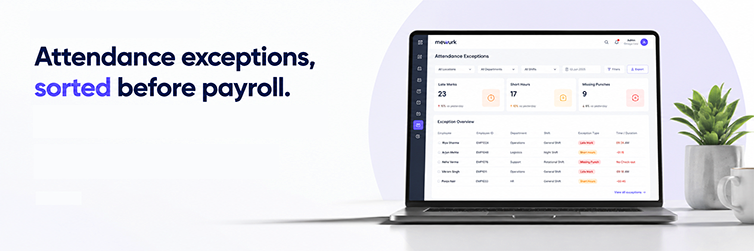
Attendance exceptions refer to differences in an employee's attendance record, working hours, or shift timing. HR or the manager can check these entries and update them if needed before payroll.
An attendance entry that differs from the scheduled hours can be marked for review. HR or the manager can then check the entry and confirm or change it. Common examples include:
- Late arrival
- Early departure
- Short working hours
- Missing punch (no check-in or check-out recorded)
- Unapproved absence
- Overtime or extended working hours
- Shift mismatch, where the recorded shift doesn't match the assigned roster
- Incorrect attendance status
- Duplicate or otherwise abnormal attendance entries
Some issues are fixed after they are reviewed. Others may require the employee or manager to make a change. In some cases, HR may ask for a regularization request. The main purpose is to check attendance entries before they are used for payroll.
Why Do Attendance Exceptions Matter?
Attendance exceptions touch more parts of the business than most people expect. Here's how they play out for each group involved.
For HR
Every unresolved exception usually becomes manual work. HR has to check the attendance details, find the reason, and take the required action. This may involve correcting entries, answering employee questions, handling regularization requests, and checking attendance details before payroll.
For Payroll
Attendance data is used to calculate payroll, so attendance issues that are not corrected before payroll can change salary calculations, leave deductions, overtime pay, and payable days. Several pending attendance issues close to payroll processing can also leave HR with multiple entries to check at once.
For Employees
A missed punch or incorrect leave entry can go unnoticed during the month. The employee may only spot it when checking the attendance record after payday. They then have to contact HR to get the record checked.
For Management
Attendance records are also used for shift planning, productivity checks, and employee counts. When attendance entries are not checked, errors can remain in the records. Over time, this can make it harder for HR to use the data for these tasks.
It's worth being clear here: how a specific exception actually affects someone's salary depends entirely on the organization's own policy, its employment terms, and any applicable rules. There's no single universal treatment that applies across every company.
4 Most Common Attendance Exceptions
HR regularly handles four common types of attendance issues.
| Attendance Exception | What It Means | Common Cause | HR Action |
|---|---|---|---|
| Late Mark | Employee arrives after scheduled time | Late arrival | Review policy/approval |
| Short Hours | Employee works fewer than expected hours | Early exit/late arrival | Review attendance |
| Missing Punch | Check-in/out is missing | Forgot punch/system issue | Verify and regularize |
| Overtime | Employee works beyond scheduled hours | Extended work | Verify and approve |
Let's go through each of these in more detail.
1. Late Marks
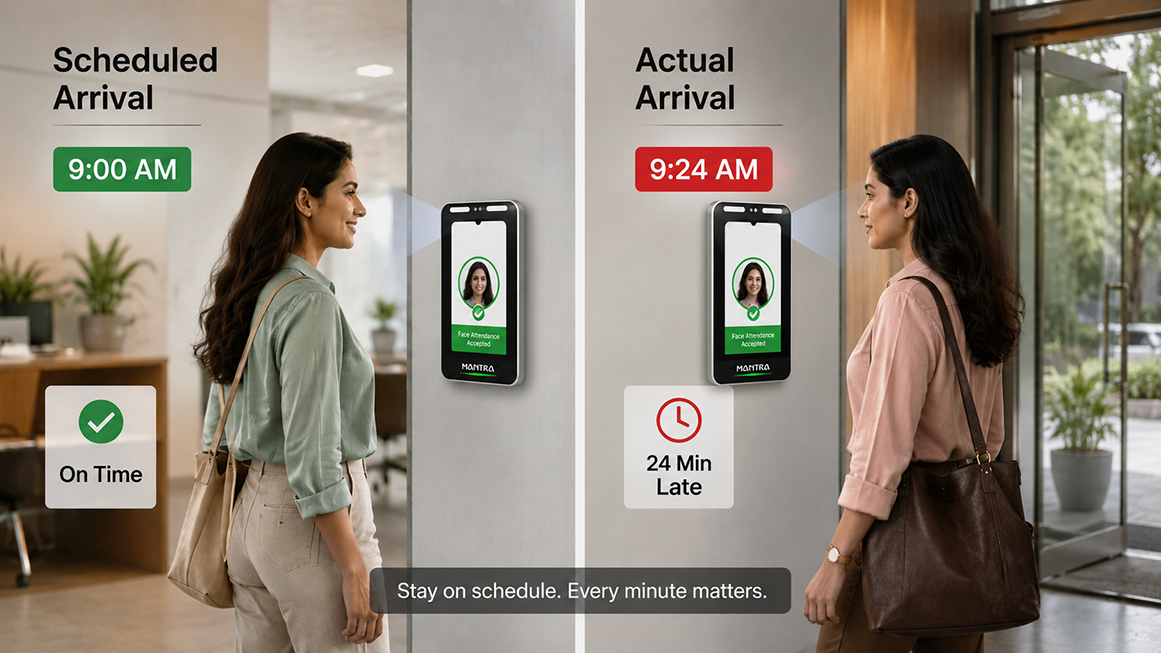
A late mark simply means an employee's recorded arrival time falls after their scheduled shift start. It sounds straightforward, but the reasons behind it rarely are. Traffic, a delayed commute, a personal emergency, a genuine device or app issue, or occasionally, just running late, all end up looking identical in the raw attendance data. The context only shows up once someone asks.
Most companies build some flexibility into how they treat this. A grace period, if the policy includes one, gives employees a small window past their shift start time before an arrival counts as late. But there's no standard grace period that applies everywhere. Some companies allow ten minutes, some allow none, and some vary it by role or shift. It comes down entirely to what the organization's own attendance policy defines.
An employee's shift runs from 9:00 AM to 6:00 PM. Their system shows an actual arrival of 9:24 AM. Whether this gets logged as a late mark, and what happens next, depends on the company's grace period, if any, and its documented late-arrival policy. HR's job here is to check that policy and apply it consistently, not to assume a fixed rule that may not exist.
Repeated late marks are a different conversation from a single one. One late arrival is usually just noted. A pattern across several weeks is usually something HR and the employee's manager need to actually discuss.
How Should HR Handle Repeated Late Marks?
A consistent workflow helps keep this fair and predictable:
Identify → Verify → Notify → Review → Approve/Regularize → Monitor
- Identify: Flag employees with recurring late marks over a defined period, say a month.
- Verify: Check whether the pattern is genuine or the result of a data or device issue.
- Notify: Let the employee and their manager know the pattern has been noticed.
- Review: Give the employee a chance to explain, and have the manager weigh in.
- Approve/Regularize: Where appropriate, approve the explanation or apply whatever correction is warranted.
- Monitor: Keep tracking going forward rather than treating it as a one-time fix.
A late mark does not always mean a salary deduction. Whether the company makes a deduction and how the amount is calculated depends on its policy. HR should also keep notes from the discussion, the employee's explanation, and the final decision. This can help if the same issue happens again.
2. Short Hours
Short hours refers to a case where an employee's recorded working time falls below what their shift or role expects for that day. It's distinct from an absence. The employee was there, at least for part of the day, but their total working time doesn't add up to the full expected duration.
A few things typically cause this:
- Arriving late without a corresponding late exit
- Leaving before the shift officially ends
- An extended break that runs longer than allowed
- A partial-day absence, such as a half-day leave that wasn't logged correctly
- Missing attendance data for part of the shift
- A shift mismatch, where the system compares actual hours against the wrong shift definition
Example: An employee's scheduled working time for the day is 8 hours. The system records 6 hours 45 minutes. Before this gets treated as a shortfall in any formal sense, HR needs to understand why. It could be an approved partial-day leave that wasn't marked properly, a system error, or simply an early exit that needs a manager's review.
How to Manage Short Hours Fairly
A structured approach avoids both over-correcting and under-correcting:
- Define expected working hours clearly for each role and shift, so there's a baseline to compare against.
- Set clear short-hour rules, including how much of a shortfall triggers review.
- Capture actual working time accurately, ideally through a system rather than manual logs.
- Allow employees to provide explanations where the policy permits it, instead of assuming the worst.
- Route exceptions for approval to the right manager so decisions aren't made in isolation.
- Maintain an audit trail of what was flagged, reviewed, and decided.
- Apply payroll treatment according to policy, not on a case-by-case basis.
3. Missing Punches
A missing punch means an expected check-in or check-out simply isn't in the system. The employee may well have worked the full day, but without both ends of the record, the system has no way to calculate their working hours on its own.
This happens more often than most people expect, and usually for mundane reasons:
- The employee genuinely forgot to punch in or out
- A biometric device malfunctioned or wasn't working that day
- A network or connectivity issue on-site
- A mobile attendance app failed to register the location or the tap
- Confusion around shift timing, especially during a schedule change
- The employee used the wrong attendance method that day
A missing punch does not always mean the employee was absent. The entry should be checked before marking the employee absent. Marking an employee absent without checking the attendance entry can lead to questions about the record.
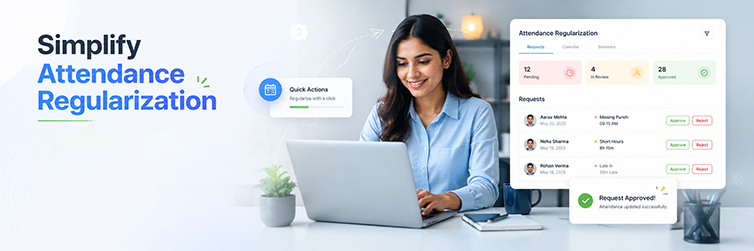
Missing Punch Regularization Process
A simple, repeatable process keeps this from becoming a back-and-forth over email:
- The employee submits a correction or regularization request for the specific date.
- The employee provides a reason for the missing punch.
- The manager or HR reviews the request against whatever context is available.
- If approved, the attendance record is corrected to reflect the actual working time.
- The updated, approved attendance flows into the relevant HR and payroll processes.
The exact approval steps and who's authorized to approve at each stage will vary from one company to the next. What matters more than the specific steps is that there's a defined process at all, rather than each missing punch being handled ad hoc.
4. Overtime
An employee may work past the end of their scheduled shift. The hours worked after the shift can be added to the overtime total. For instance, if the shift ends at 6 PM and the employee works until 8 PM, those two hours are counted as overtime.
An employee may be scheduled from 9:00 AM to 6:00 PM but continue working until 8:00 PM. The extra two hours do not always mean paid overtime. The outcome depends on the company's overtime policy and the rules that apply to the workplace. Some companies require overtime to be approved or checked by a manager before it is included in payroll.
How HR Should Track Overtime
A consistent overtime process typically covers:
- Scheduled hours for the shift in question
- Actual hours recorded by the attendance system
- Approved overtime, distinct from hours simply logged as extra
- Reason for overtime, especially for recurring cases
- Manager approval, ideally captured before or shortly after the extra hours are worked
- Payroll treatment, applied according to the organization's own policy
The workflow generally looks like this:
Attendance → OT Detection → Manager Approval → Payroll Input → Reconciliation
This check is important because overtime that has not been approved or checked can be added to payroll and lead to questions later. HR may need to confirm the hours worked and whether the overtime was approved.

Attendance Exceptions vs Attendance Regularization
These two terms are used almost interchangeably sometimes, but they describe different stages of the same process.
| Attendance Exception | Attendance Regularization |
|---|---|
| Identifies an attendance issue | Process to correct or approve it |
| Can happen automatically, flagged by the system | Usually requires employee or manager action |
| Examples: missing punch, short hours | Example: a request to correct a missing punch |
| Needs review | Results in an approved correction, where applicable |
Put simply, an exception is the system noticing that something doesn't match expectations. Regularization is the human step that follows, where someone reviews it and either corrects the record or confirms it as accurate. One doesn't happen without the other in a well-run process.
How Attendance Exceptions Affect Payroll
Payroll uses attendance data in many companies, so attendance errors can also affect salary calculations. The process is usually:
Attendance Data → Exceptions → Review/Approval → Final Attendance → Payroll
Once attendance is finalized, it typically informs a few payroll-related inputs:
- Payable working days
- Unpaid absence, where applicable
- Approved overtime hours
- Total working hours for the period
- Leave taken and leave balances
- Any attendance corrections made through regularization
It's important not to oversimplify this. A specific exception, say, a single late mark or one missing punch, doesn't automatically translate into a fixed salary deduction across every company. The actual payroll treatment depends on:
- The company's own attendance and payroll policy
- The employee's specific employment terms
- Applicable labour law and regulations relevant to that organization
- The final, approved attendance record after regularization
HR and payroll teams that finalise attendance before running payroll, rather than treating both as parallel, disconnected processes, tend to run into far fewer disputes after salaries go out.
Attendance Exceptions in Shift-Based Workforces
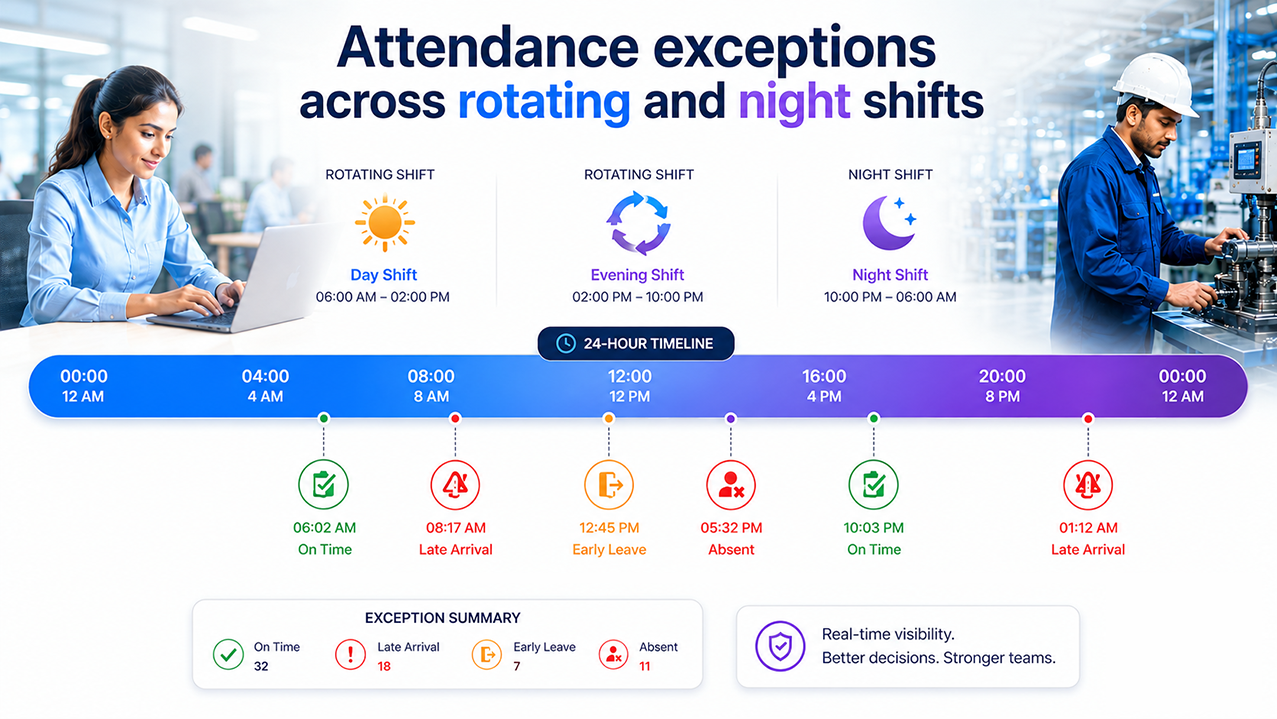
Workplaces may have different schedules. Some employees work night shifts, rotating shifts, or different shifts during the day. Attendance needs to be recorded according to the shift assigned to each employee.
A few scenarios worth planning for:
- Rotating shifts, where an employee's scheduled hours change week to week, need the system to compare attendance against the correct shift for that specific day, not a fixed default.
- Night shifts often cross midnight, which complicates how a "day" of attendance is even calculated.
- Multiple concurrent shifts running at one site mean a late mark on one shift shouldn't be judged against another shift's timing.
- Shift changes, whether planned or last-minute, need to update the expected schedule before attendance is compared against it, or every changed shift will look like an exception.
- Cross-midnight shifts specifically need clear rules on which calendar day the hours get credited to.
For businesses running this kind of schedule, generic attendance logic built for a single fixed shift usually creates more false exceptions than genuine ones, simply because the system is comparing actual attendance to the wrong expected schedule.
Attendance Exceptions in Multi-Location Teams
Businesses with multiple locations handle attendance differently. Employees may work across branches, sites, or remote locations, so attendance information can come from different sources.
Common complications include:
- Different attendance devices installed at different branches, sometimes from different vendors
- Employees using mobile attendance where there's no fixed device at all
- Multiple branch locations, each potentially running its own shift patterns
- Different managers responsible for approvals at each site
- Field employees whose "location" changes daily
- Shift schedules that vary from one branch to another
When attendance is stored in different places, HR has to collect records from each location before checking for attendance issues. One system can keep attendance from all locations in one place. This makes it easier to review entries using the same process instead of checking each branch separately.
Manual Attendance Exception Management vs Automated System
Here's how the two approaches typically compare in practice.
| Process | Manual/Excel | Attendance Software |
|---|---|---|
| Missing Punch Detection | Manual | System-based |
| Late Mark Identification | Manual | Automated rules |
| Short Hours | Manual calculation | Automated calculation |
| OT Tracking | Manual | System-based tracking |
| Regularization | Email/Excel | Workflow-based |
| Approval | Manual follow-up | Configurable workflow |
| Reporting | Manual | Automated reports |
| Payroll Inputs | Manual transfer | Integrated workflow where supported |
Features and workflows vary by software provider and configuration, so it's worth checking exactly what a given platform supports before assuming a particular capability is included.

How Mewurk Helps Manage Attendance Exceptions
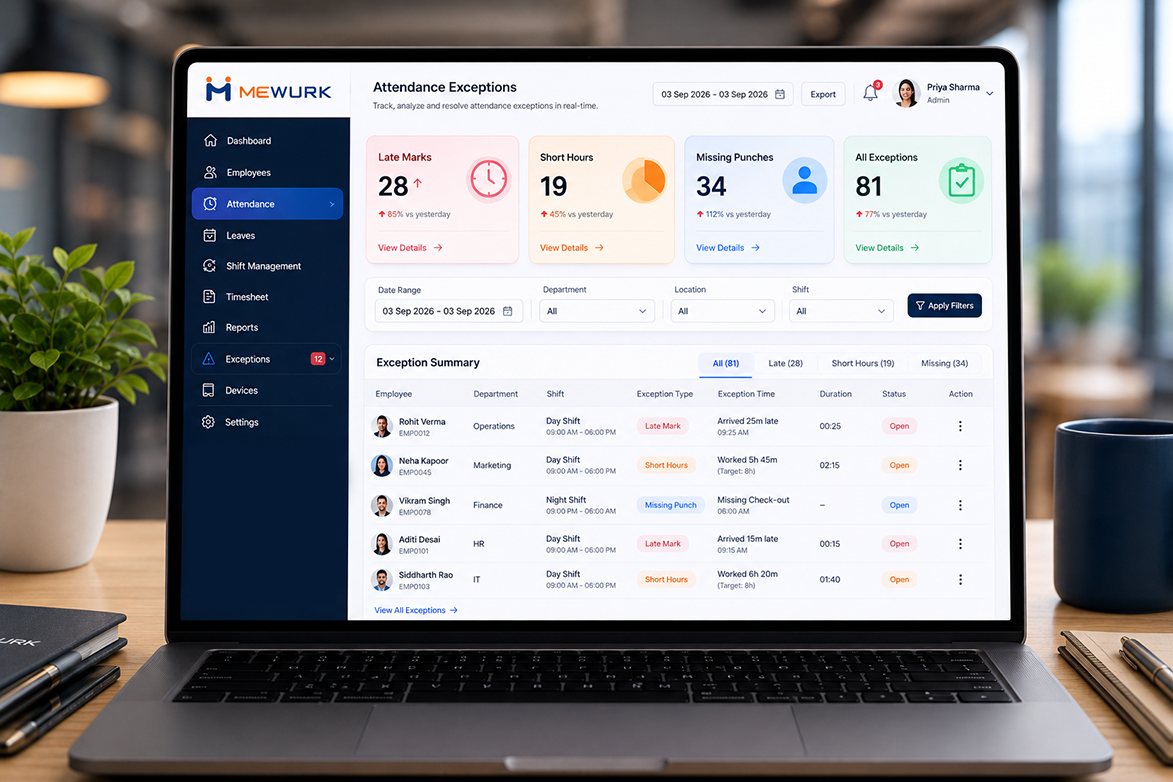
Mewurk is built to support attendance exception management as a connected process rather than a set of disconnected steps. Rather than HR manually checking spreadsheets to catch late marks or missing punches, the platform captures attendance data and flags irregularities for review.
Some of the relevant capabilities include:
- Attendance management that captures check-in and check-out data across sites
- Mobile attendance for field staff and employees without a fixed device
- Face recognition attendance to reduce buddy punching and disputed entries
- Geo-fenced attendance for location-based verification
- Shift scheduling that keeps expected hours accurate across rotating and multiple shifts
- Attendance regularization workflows for missing punches and other corrections
- Leave management connected to attendance so partial-day cases are easier to trace
- Overtime tracking, where supported, with approval steps built in
- Reports and analytics covering exceptions, trends, and pending approvals
- Payroll integration and workflows, where supported, to reduce manual data transfer
In practice, the flow looks like this:
Employee Attendance → Exception Detection → Review/Regularization → Approved Attendance → Payroll
It's worth being direct here: Mewurk doesn't automatically resolve every attendance exception on its own. Judgment calls, like whether a late mark warrants a conversation or whether overtime should be approved, still involve a manager or HR decision. What the platform does is surface exceptions clearly, route them through a defined workflow, and keep the data connected end to end, so fewer things fall through the cracks before payroll.
Attendance Exception Management Checklist for HR
A simple recurring checklist keeps exceptions from piling up unnoticed.
How to Reduce Attendance Exceptions
None of these strategies eliminate exceptions entirely, since some causes, like a genuine device fault, are outside anyone's control. But they cut down the volume considerably:
- Create a clear attendance policy that employees can actually reference, not just something buried in an HR handbook.
- Define shift timings clearly for every role, including how changes get communicated.
- Set appropriate approval workflows so exceptions don't sit waiting on one person.
- Make attendance rules visible to employees, ideally through self-service access rather than word of mouth.
- Provide easy regularization so employees aren't discouraged from reporting a genuine issue.
- Use reliable attendance capture methods suited to the workforce, whether that's biometric, mobile, or a mix.
- Review recurring exceptions rather than treating each one in isolation.
- Train employees on how and when to punch in, especially during onboarding.
- Track exception patterns over time to catch systemic issues, like a device that regularly fails.
- Connect attendance with payroll where appropriate, so approved data doesn't need manual re-entry.
Attendance Exception Metrics HR Should Track
A handful of recurring metrics give HR a clearer read on how well exceptions are being managed:
- Number of missing punches—indicates how often check-in or check-out data is incomplete, and whether it's concentrated at specific sites or devices.
- Late marks per employee—helps distinguish an occasional late arrival from a genuine pattern worth discussing.
- Short-hour cases—shows how often recorded hours fall below expectations, and whether it's linked to particular shifts.
- Overtime hours—tracks how much extra time is being logged and whether it's consistently approved or frequently disputed.
- Regularization requests—reflects how often employees need to correct their own attendance, which can point to device or process issues.
- Pending approval requests—highlights bottlenecks where exceptions are waiting too long for a decision.
- Repeated attendance exceptions—flags employees or locations that need closer attention.
- Exception resolution time—measures how quickly flagged issues are reviewed and closed out.
- Attendance-related payroll corrections—shows how often unresolved exceptions are still slipping through to payroll.
There's no universal benchmark for what a "good" number looks like on any of these, since it depends heavily on company size, industry, and workforce structure. What matters more is tracking the trend for your own organization over time.
Frequently Asked Questions
What are attendance exceptions?
Attendance exceptions are deviations from an employee's expected attendance, working hours, or shift schedule that need review, correction, or approval. Common examples include late marks, short working hours, missing punches, and overtime. They don't automatically indicate misconduct and often result from system issues, forgotten punches, or approved work variations.
What causes late marks in attendance?
Late marks usually happen when an employee's recorded arrival falls after their scheduled shift start. Causes range from commute delays and personal emergencies to device or app issues. Whether a specific arrival counts as late, and whether any grace period applies, depends entirely on the company's own attendance policy.
How should HR handle a missing punch?
A missing punch should be treated as something to verify, not an automatic mark of absence. HR typically asks the employee to submit a regularization request with a reason, has a manager or HR review it, and corrects the record if approved before it flows into payroll.
Does overtime always mean extra pay?
Not necessarily. Extra hours worked beyond a scheduled shift may qualify as overtime, but whether they're compensated, and how, depends on the company's overtime policy and any applicable labour regulations. Many organizations also require manager approval before extra hours are treated as billable overtime.
What's the difference between an attendance exception and regularization?
An exception is the system or process identifying an attendance issue, such as a missing punch or short hours. Regularization is the follow-up step where an employee or manager reviews the issue and corrects or approves the record. One typically leads to the other.
Do attendance exceptions always affect salary?
Not automatically. The payroll impact of a specific exception depends on the company's policy, the employee's employment terms, and applicable law. It's the final, approved attendance record, after any regularization, that actually feeds into payroll calculations.
How can attendance software help with exceptions?
Attendance software can automatically flag late marks, short hours, missing punches, and overtime based on defined rules, and route them through a regularization or approval workflow. This reduces manual tracking, though decisions like whether to approve a specific case still typically involve a manager or HR.
How often should HR review attendance exceptions?
Many HR teams review missing punches and unusual entries daily, look at repeated exceptions and overtime weekly, and do a final review before every payroll cycle to make sure all exceptions are resolved and attendance is payroll-ready.
Key Takeaways
- Attendance exceptions are deviations that require review or correction, not automatic evidence of employee misconduct.
- Late marks, short hours, missing punches, and overtime are the four most common examples that HR deals with.
- Not every exception should automatically result in a payroll adjustment; treatment depends on company policy.
- Clear policies and defined approval workflows help HR handle exceptions consistently across teams and locations.
- Automated attendance systems can reduce manual tracking and give HR better visibility into recurring patterns.
- Connecting approved attendance data with payroll can reduce repetitive data entry and last-minute payroll corrections.