
Why Attendance Regularisation Matters and How Mewurk Does It Right?
We all slip up on attendance sometimes. Maybe you rushed straight into a client call and forgot to clock in. Or the biometric machine didn’t catch you in your hurry. Or you were working at another location, but the system still marked you absent.
These small slips shouldn’t lead to payroll errors or unnecessary leave cuts. That’s why attendance regularisation exists. To clear up mistakes without extra back-and-forth with HR.
Mewurk's attendance management system software has built a very convenient option to regularise attendance right into the system. Utilising this feature, employees can apply attendance regularisation in seconds, and their managers can approve it with simple clicks. In practice, it’s simple and done right inside the system.
In this blog, let’s break down what attendance regularisation means, how it works, why it matters, and how Mewurk keeps it fair.
What Is Attendance Regularisation?
Attendance regularisation refers to the process of correcting incorrectly processed attendance records after an employee misses or fails to log their punch. For example, if someone arrives on time but fails to mark their attendance, they can request attendance regularisation. Once approved by the manager, the record is updated in the software.
What Happens When You Forget To Mark Attendance?

Here is a common scenario for you to understand what happens when marking attendance is slipped. An employee comes in. He is on time but forgets to punch in. Once the allowed time to clock in passes, the system marks them absent.
If there is no provision in the software for attendance regularisation, both the employee and the HR will forget about this incident. Towards the end of the month, when the attendance data is moved to the payroll system, the payroll software will assume it as an Loss of Pay (LOP ) and process a deduction.
Inevitably, HR gets a complaint. Now someone has to dig through the employee’s entire month’s logs, talk to managers, get approvals, and fix the payroll entry manually either right away or in the next month’s cycle.
Multiply this by dozens of employees over hundreds of workdays. The result is messy. Employees feel unfairly penalised, HR feels overworked, and managers are caught in the middle. Attendance regularisation solves this gap.
What Does Attendance Regularisation Look Like in Mewurk?
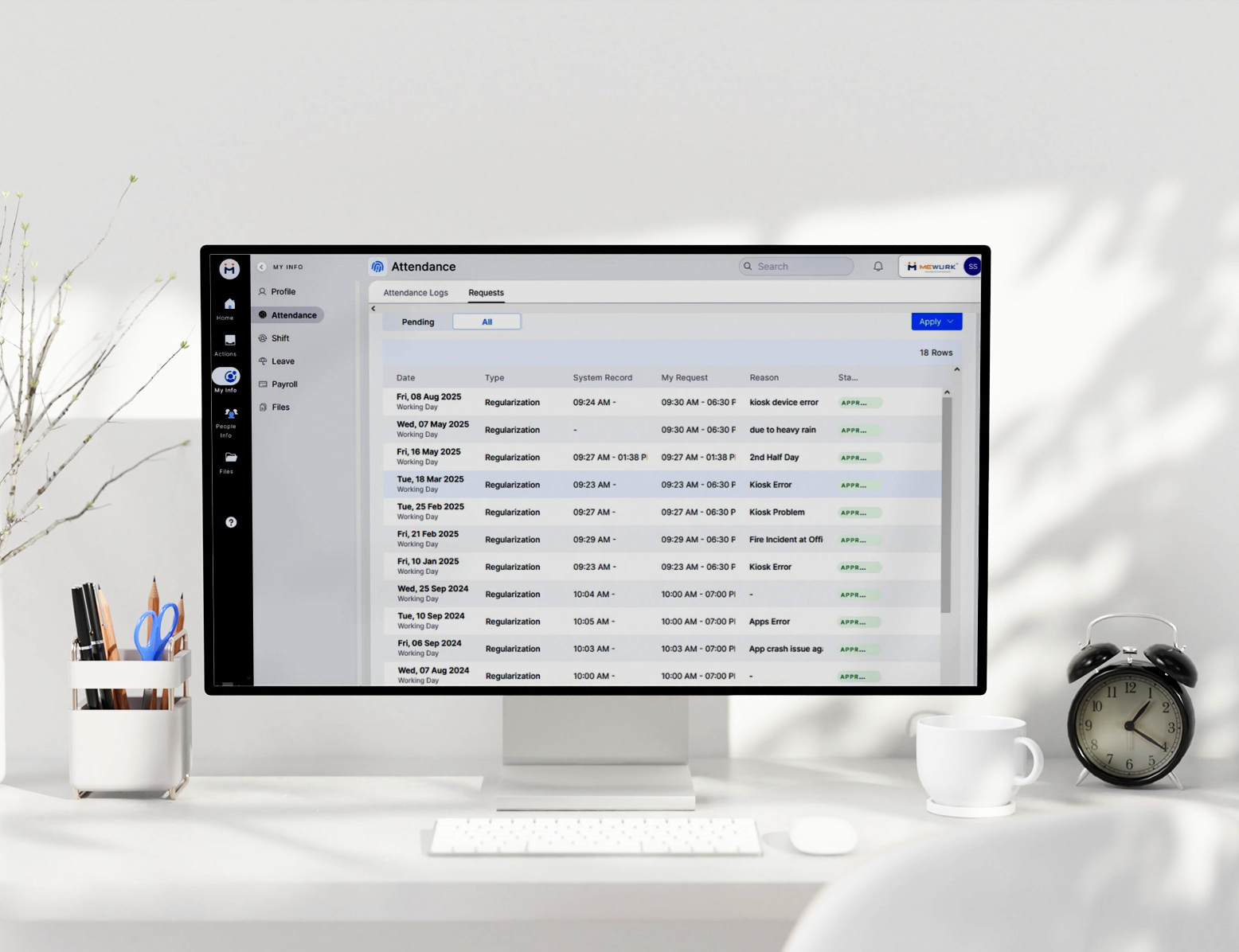
Mewurk HR management software features a smart attendance module where employees can get their attendance anomalies regularised without delays, needing to send long email requests or pleading with HR. From an employee’s side, here’s how it works.
- Open the Mewurk HR web portal and login to your account with the credentials.
- From the left panel, select My Info, and then choose Attendance.
- Click on the Apply button at the top right corner. It will pop up two options now. Apply leave and Apply Regularisation.
- Select Apply Regularisation from the choices.
- Select Date and choose the regularisation type: forgot to punch, on-duty, shift correction, etc.
- Enter the right in/out times.
- Add a reason (optional).
- Hit Apply.
Done. The request will go straight to their manager or admin. No need for extra follow-ups or messages like ‘kindly regularize my attendance’.
Manager’s Side of Attendance Regularisation in Mewurk
On the manager's side, there’s a Regularisation Report. It’s basically a dashboard that shows all pending, approved, and rejected requests.
- You see who applied, for which day, and why.
- Actual time vs. requested time is right there.
- One click to approve, one click to reject.
The status is updated instantly for the employee to see. It also works for admins overseeing large teams. They can filter reports by “All Employees” or just their “Direct Reports,” so approvals don’t get lost in a pile.
How to Keep Attendance Regularisation Fair and Transparent?
Not every missed punch can be regularised. Otherwise, the whole attendance system will lose its meaning. That’s where Mewurk’s custom attendance policies come in. Admins or HR can set clear rules regarding who can legibly submit an attendance regularisation application. As such, they can define:
- How many times in a month can an employee request regularisation?
- What reasons are allowed (forgot punch, on-duty, shift correction, etc.)?
- Deadlines for applying (same day, within 2 days, within a week, etc.).
- Approval flow (manager only, or manager + HR).
This way, no one can take unfair advantage of the attendance regularisation feature. Employees know their limits, managers know their boundaries, and the system enforces it all automatically.
What Differences Can Attendance Regularisation Make?
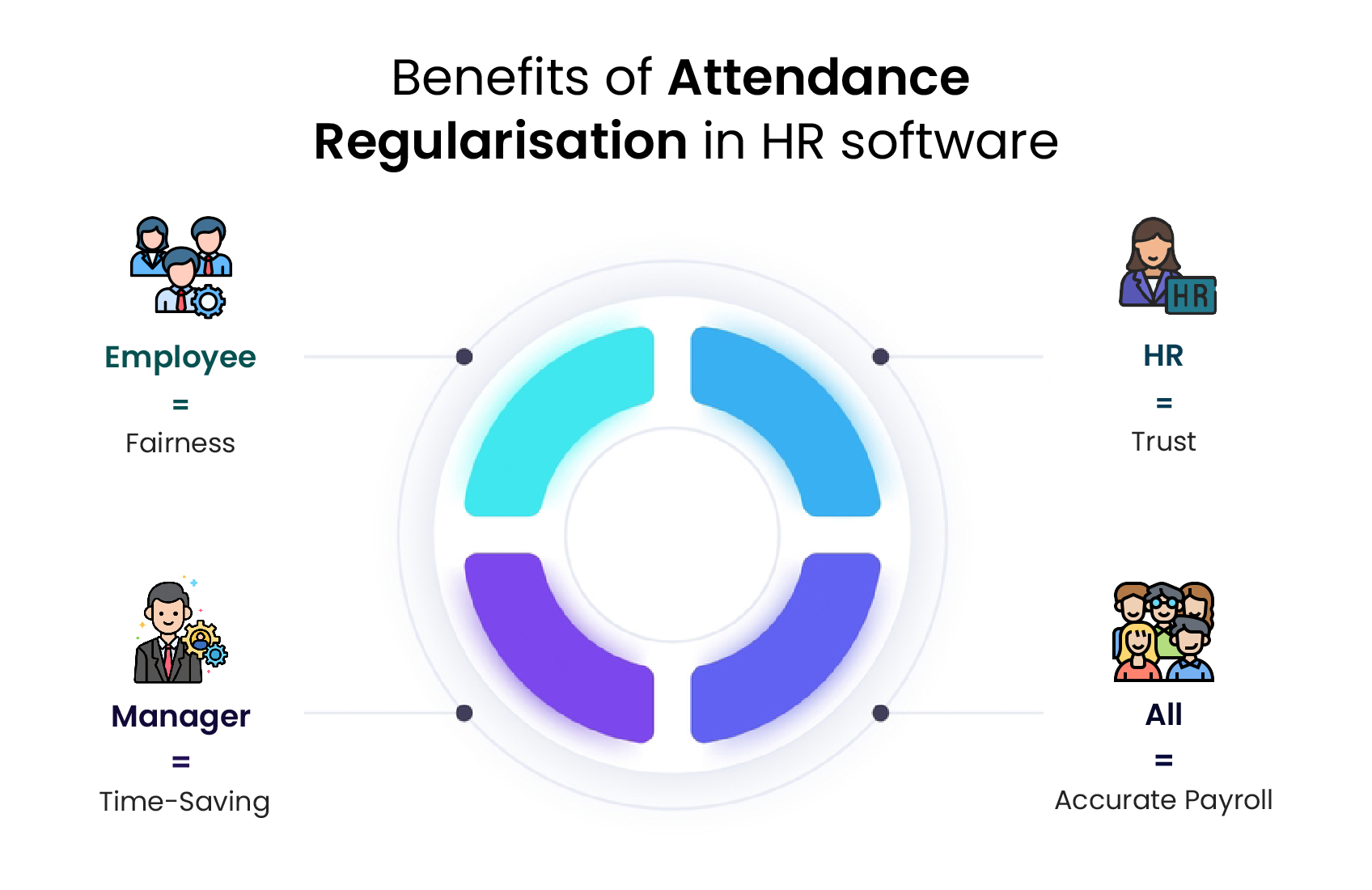
Having the option to regularise attendance brings a lot of differences (as conveniences) to the employees, HRs and the management. Here are some of the key benefits you can have from its incorporation in the software.
Accuracy in Payroll:
Payroll errors often stem from attendance anomalies. By having the attendance regularisation feature in the employee self-service portal, they can verify before their
Time Saved for HR:
Instead of wasting time going through piles of attendance regularisation mails from employees, HR can instantly see the requests on the software dashboard in the designated access panel and take the necessary steps immediately.
Trust with Employees:
Staff feel that they are not judged for making genuine mistakes and that those mistakes won’t cost them a cut in their paychecks. That’s something extremely important in building their morale.
Fairness for Everyone:
Attendance regulation is done as per the organisation’s pre-defined time and attendance policies. The same rules apply to everyone. No one gets favours from HR or team leaders in it.
Regularisation in Action: The Flow on a Normal Day
Let’s understand how the attendance regularisation application process plays out in reality.
- Employee side: Employee A forgets to punch in. She logs into her Mewurk portal, selects Forgot to punch from Apply Regularisation under Attendance, adds her shift time, and submits. The whole thing is completed in under a minute.
- Manager side: The request pops into their dashboard. They see that employee A was working that day (maybe cross-checked with tasks or meetings) and approve it.
- System side: Attendance data gets updated automatically in the background when these steps are completed. When the payroll is run, it pulls the right data without letting the missed clock-in incident affect the accuracy.
Compare this to the old way: Employee A emails HR, HR emails the manager, the manager replies late, HR adjusts attendance manually, and payroll still misses it.
Common Attendance Regularisation Types for Daily Organisational Workflows
Different workplaces face different attendance issues. Mewurk attendance management software supports multiple regularisation types:
- Forgot to Punch – The most common case, when an employee forgets to clock in or out.
- Shift Correction – Useful when someone is moved to a different shift last minute.
- On-Duty – For employees working offsite or attending client meetings.
- Others – Flexible categories as per company policy.
Each request type is logged and auditable. Every update is visible, with no silent backdating.
Get Clarity Through Regularisation Reports
Mewurk HR software helps generate instant attendance regularisation reports. More than just tracking approvals, it works as a tool for insights, tracking trends, and informing decision-making. Here are some examples of what you can uncover through these reports.
- Who’s frequently forgetting to punch?
- Which shifts see the most corrections?
- Are on-duty requests spiking in certain teams?
These insights help HR refine their attendance policies if needed, improve shift planning, or even upgrade devices if a specific location has too many punch errors.
Conclusion
Attendance regularisation is just one piece of the attendance puzzle. At its core, it reflects a very simple philosophy: workforce management should be flexible and human-first.
People slip up. Systems break. The important part is fixing it quickly and fairly. Mewurk keeps it easy with just one click.
Want to keep your attendance data clean and fix errors hassle-free?
Get started with Mewurk today!FAQ
Is there a deadline for submitting attendance regularisation requests in Mewurk?
Deadlines to submit requests to change errors to regular attendance depend on the company’s policies, which can be customised in Mewurk HR. Typically, organisations set a timeframe (e.g., within 2–5 days or the same pay cycle) to ensure timely payroll processing and compliance.
How does Mewurk’s attendance regularisation integrate with payroll processing?
Once a regularisation request is approved by the team leader or HR, Mewurk HR software updates the data in real-time so that accurate payroll can be processed without adjusting anything manually.
Can Mewurk’s attendance regularisation feature handle bulk requests for large teams?
Yes! Mewurk makes bulk attendance corrections easy. Admins don’t have to handle requests one by one. Instead, they can approve multiple requests at once. It’s built to handle large teams efficiently, with filters for employees or teams to keep everything organised.
How does Mewurk ensure fairness in the attendance regularisation application?
Mewurk allows HR to set clear policies, such as limits on the number of regularisation requests, valid reasons (e.g., forgot to punch, shift correction), and deadlines for submissions. These rules are applied uniformly. Every employee can easily figure out what attendance regularize meaning is in their context. As a result, there are fewer instances of misuse of the feature.

Most Popular Post

Why Accurate Attendance and Leave Management Matters for Business Growth?
Read More →Why Accurate Attendance and Leave Management Matters for Business Growth?
How To Leverage Attendance Data For Better Workforce Management?
Read More →How To Leverage Attendance Data For Better Workforce Management?